A governed self-service legal portal is an intake and triage platform that applies decision logic and multiple AI models under audit, routes requests to the right owner, and logs every action for compliance review. Legal ops teams adopt one when intake volume outpaces staff capacity and email chains stop producing a defensible record. The right time to build one is before a privilege dispute or audit forces the question.
Neotalogic
Govern Legal Intake With AI
Neota Logic helps legal teams automate routine requests, apply decision logic, route work, and maintain auditable human oversight.
Table of Contents
What a Governed Self-Service Legal Portal Does for Legal Ops
A governed portal replaces the intake email inbox with structured intake. Requesters fill out conditional forms that adjust based on their answers. The system triages the request, routes it to the correct queue, and writes an audit trail the moment the form is submitted.
The operational payoff is concrete. Structured intake with conditional logic cuts the back-and-forth that eats legal ops time, because the form asks the right follow-up question the first time instead of forcing a phone call to clarify scope, as ITSM-style legal request management demonstrates. Time-to-first-action drops. Reporting improves because every request carries the same structured data set, not a paragraph of prose buried in an email thread.
This is not a public self-help tool. It is enterprise intake infrastructure for corporate legal departments and law firms managing internal or client-facing legal requests. The audience is legal ops and general counsel, not individuals representing themselves in court. Scope matters here because the governance requirements are entirely different.
Key Components and Controls Every Governed Portal Must Include
A governed portal is a set of controls, not a form builder. If any of the following is missing, the portal is a liability wearing a modern interface.
Progressive disclosure deserves particular attention. Portal design guidance recommends gathering only core case data up front and requesting supporting documents afterward, which reduces abandonment without weakening compliance.
Pro Tip: If your portal cannot show you who changed a routing rule, when, and why, it cannot survive a privilege challenge. Versioning is not a feature. It is the record that proves your process was consistent.
Electronic signature capture inside the portal has legal weight only when intent is documented. Under E-SIGN and state UETA statutes, a signature is enforceable when the signer takes a deliberate action tied to the specific document, not a passive checkbox buried in a form.
How to Configure Intake Forms and Triage Workflows
Building a governed intake workflow is a sequence, not a single project. Follow it in order.
Pro Tip: Run your test activation with someone outside legal ops. If they get stuck on step two, your real clients will get stuck there too.
How Intake Becomes Matter Work
An intake form is only the front door. What happens next determines whether the portal earns its budget line.
Governed portals connect to document management systems (DMS), contract lifecycle management (CLM) platforms, matter management systems, enterprise ticketing tools, and CRM systems. A completed intake form should auto-populate document templates, generate an internal review task, and fire a confirmation notification to the requester, following the automation pattern outlined in secure intake implementation guidance. Automated internal escalation after a fixed window, and upload acknowledgment notifications, prevent matters from stalling once a document lands, a practice flagged in portal implementation checklists as a high-impact reliability control.
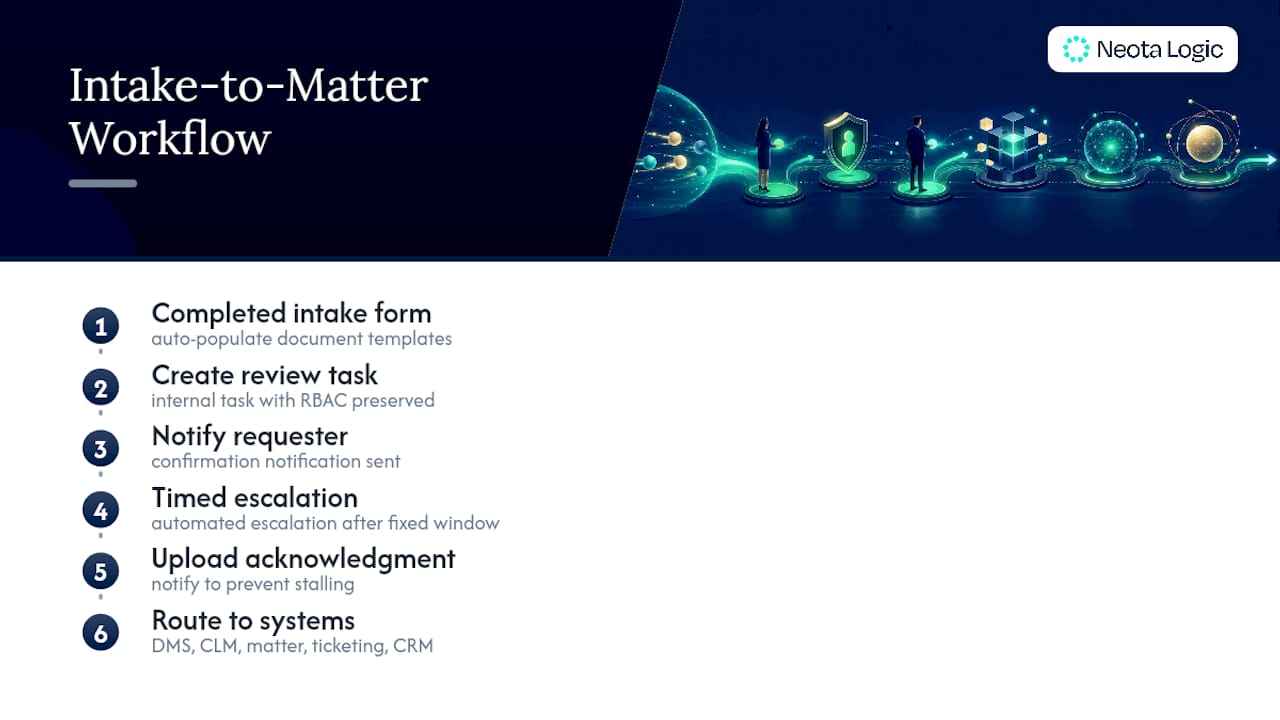
Legal ops leaders should track three reports without fail: intake volume by category, time-to-first-action, and portal activation and completion rates. Completed intake records should route directly into the firm’s DMS with RBAC intact, mirroring the record-routing standard that keeps access controls consistent from intake through storage.
Adoption and Rollout Best Practices and KPIs
A portal nobody uses is worse than no portal. It creates a false sense of governance while staff quietly revert to email.
Portal adoption rate is the single variable that determines return on investment. Vendor implementation research found that default, generic invitation emails produce activation rates of only 30 to 45 percent, while structured onboarding with a five-minute phone activation call raises that to 70 to 85 percent.
That gap is the difference between a pilot that gets funded again and one that quietly dies. Close it with these controls:
Set explicit targets: a 30-day activation rate of 65 percent or higher, a 90-day activation rate that climbs from there, a document upload completion rate, and time-to-first-action measured in hours, not days.
Governance, Compliance, and Audit Readiness
A portal that cannot produce a clean audit log under pressure is not governed. It is decorated.
Centralizing intake with consistent security standards and audit trails closes what governance analysis identifies as one of the largest blind spots in legal operations: the intake form itself. Legal teams that centralize intake and apply consistent controls avoid the scattered, unlogged request channels that create real exposure during a dispute.
Neota Logic Evidence and a Case Highlight
Neota Logic builds governed AI infrastructure for legal and compliance teams. The platform runs no-code workflows, orchestrates multiple AI models under governance, and logs audit trails with version history and explainability at every decision point. That governance layer, not any single feature, is what separates infrastructure from a point solution or a chatbot.
Fujitsu’s legal team used Neota’s workflow platform to automate intake and triage, improving turnaround time and user engagement without sacrificing oversight. The case study library shows what governed automation looks like once it leaves the pilot stage. If your team is weighing a similar move, a demo is the fastest way to see the audit trail in action.
Support and Training Resources for End Users and Administrators
End users need less training than administrators, but both groups need something concrete.
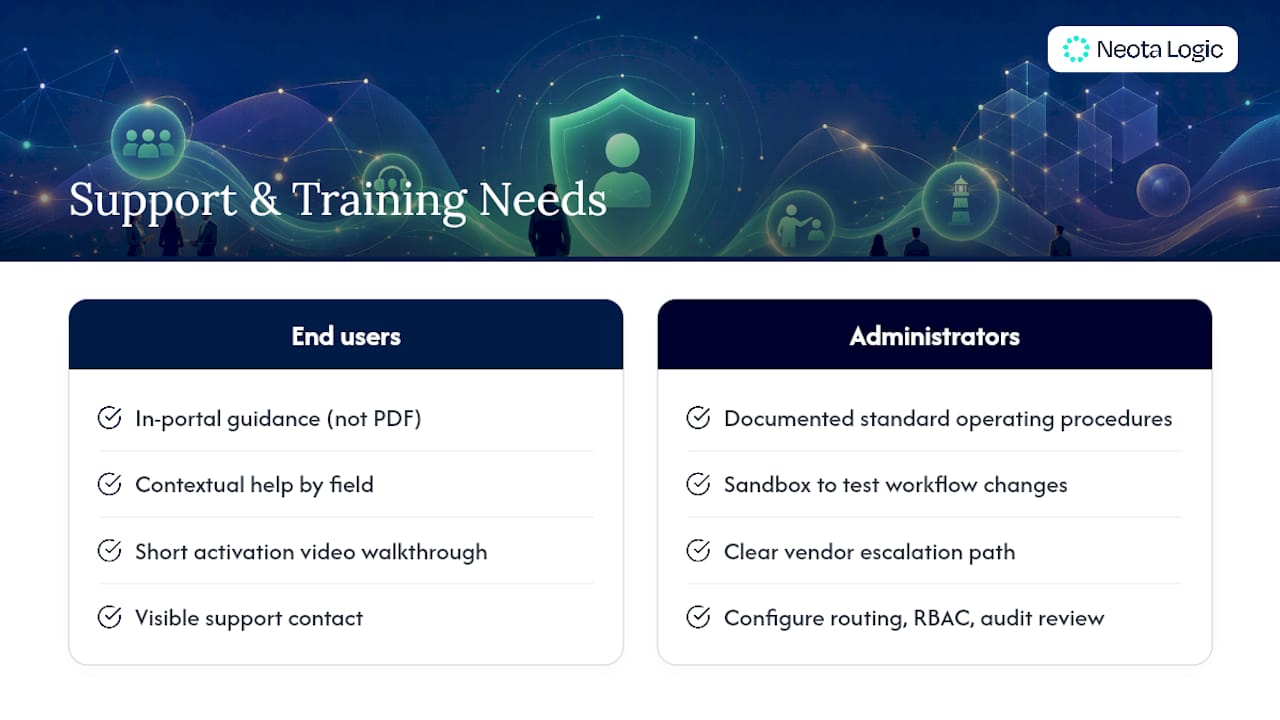
For end users, in-portal guidance beats a PDF manual. Contextual help text next to each conditional field, a short video walkthrough of the activation flow, and a visible support contact reduce abandonment far more than a lengthy onboarding email. Many teams pair this with the five-minute phone activation support already tied to adoption targets, so the same call that boosts activation also doubles as first-line training.
Administrators need a different tier of support entirely. They configure routing rules, manage RBAC assignments, review audit logs, and adjust escalation triggers. That role requires documented standard operating procedures, a sandbox environment to test workflow changes before pushing them live, and a clear escalation path to the vendor for platform-level issues. Skipping administrator training is the single most common reason governed portals drift out of configuration within the first year. Rules get bypassed manually, audit logs develop gaps, and the governance story falls apart exactly when it matters most.
Build a recurring cadence, not a one-time session. Quarterly refreshers for administrators, paired with a living internal knowledge base, keep the portal aligned with new request categories as your legal team’s needs evolve. New hires should complete both end-user and administrator training paths before they touch production data, regardless of how confident they are with similar tools from a previous role.
Accessibility Compliance for Diverse User Groups
Accessibility is a governance requirement, not a nice-to-have add-on. A portal that excludes users with disabilities creates legal exposure of its own, separate from the matters it was built to manage.
Design intake forms to Web Content Accessibility Guidelines (WCAG) standards at minimum, and align with Americans with Disabilities Act (ADA) expectations for digital services. That means proper heading structure for screen readers, keyboard navigation for every form field and button, sufficient color contrast, and alternative text for any visual element that conveys information. Conditional logic must not break screen reader flow. If a follow-up question appears dynamically based on a prior answer, the interface needs to announce that change so assistive technology users aren’t left navigating a form that silently shifted underneath them.
Language access matters too, particularly for law firms serving diverse client populations. Multilingual form support, or at minimum a clear path to request translated materials, keeps intake usable rather than merely present. Test the portal with actual assistive technology, not just an automated accessibility checker, before launch. Automated scans catch missing alt text; they rarely catch a broken tab order that traps a keyboard user inside a conditional field. Build accessibility testing into the same activation flow test recommended earlier, rather than treating it as a separate compliance checkbox added after launch.
Customization for Different Legal Practice Areas
A single intake form template does not serve litigation, contracts, employment, and compliance equally well. Each practice area has different data requirements, different urgency profiles, and different downstream document needs.
Litigation intake typically needs fields for opposing party information, jurisdiction, filing deadlines, and litigation hold triggers, often routed with a shorter SLA window given deadline sensitivity. Contract requests benefit from conditional logic that branches based on contract type, since an NDA needs far less detail up front than a multi-party vendor agreement with indemnification terms. Employment matters carry heightened sensitivity around personal data, which makes progressive disclosure especially important. Compliance requests often need direct links to a regulatory framework or policy reference, so the requester and reviewer share the same context immediately.
The governance-first advantage here is configurability without rebuilding the platform. A no-code workflow layer lets legal ops adjust categories, fields, and routing per practice area without a development cycle, using the same underlying audit and access controls across every category. That consistency matters: a portal where litigation intake follows different security rules than contract intake is not actually governed. It is fragmented governance wearing a single login page. Reviewing intake form examples across practice areas is a practical way to see how conditional branching adapts without compromising the underlying control set.
Scalability and Performance for High Request Volume
A portal that performs well in a ten-person pilot can behave very differently once every department in a multinational company can submit a request. Legal ops leaders need to ask the volume question before signing, not after the first quarter-end crunch.
Peak load matters more than average load. Legal request volume spikes around contract renewal cycles, fiscal year-end, and regulatory filing deadlines, so a platform needs to handle burst traffic without slowing form submission or triage logic. Slow load times at the exact moment intake volume peaks push staff straight back to email, undoing months of adoption work.
Routing and triage logic also need to scale independently of raw traffic. As request categories multiply across practice areas and business units, the decision engine evaluating conditional logic must apply the same rules consistently whether it is processing ten requests an hour or a thousand. That consistency is itself a governance property. A routing decision that behaves differently under load than it does in a demo is not explainable, no matter how clean its logic looks in testing.
Ask any vendor directly how their platform handles concurrent form submissions, how audit logging performance holds up at scale, and how integrations with DMS or CLM systems queue under heavy load. Those are infrastructure questions, and infrastructure is exactly what separates a governed platform from a lightweight form tool that happens to have a legal skin on it.
Connecting to External Legal Databases and Research Tools
Intake and triage do not happen in isolation from the research and reference material legal teams rely on daily. A governed portal should connect outward, not just inward to your own DMS.
Practical integration points include linking a matter record to relevant case law databases, regulatory tracking tools, or internal policy repositories the moment a request is categorized. A compliance request tagged under a specific regulatory framework, for instance, can automatically surface the internal policy document tied to that framework, cutting the research step the assigned reviewer would otherwise perform manually. This is where multi-model AI orchestration under governance earns its place: different AI models can support different research or drafting tasks within the same workflow, without locking the legal team into one vendor’s model for every function.
The governance requirement does not disappear at the integration layer. Every external lookup, every AI-assisted research step, and every auto-populated reference needs the same audit trail and explainability standard applied to the intake form itself. An integration that pulls case law into a matter file but leaves no record of what was pulled, when, or why is a gap in the same governance chain the rest of the portal was built to protect.
Why Governance Has to Come Before Convenience
Legal ops teams keep buying intake tools for speed and discovering governance gaps months later. That ordering is backward. Speed without an audit trail is not efficiency. It is exposure you have not measured yet.
The uncomfortable truth is that most portals marketed to legal teams optimize for a smooth client experience first and treat governance as a compliance afterthought bolted on before the sales demo. That approach works fine until a privilege dispute, a regulatory inquiry, or a departing employee forces someone to explain exactly how a routing decision was made six months ago. At that point, a portal without version history and explainability cannot defend itself, and neither can the legal team that chose it.
Start with a pilot that has adoption targets attached from day one, not a pilot that measures success by whether people logged in once. A governed intake and triage workflow is worth building only if it is built to survive scrutiny, not just to look modern in a vendor pitch.
How Neota Logic Supports a Governed Intake Pilot
Neota Logic is is the alternative to stitching together a form builder, a workflow tool, and a separate AI vendor for legal intake. Instead of assembling point solutions and hoping the audit trail holds together across three systems, you get one governed platform: no-code workflows, multi-model AI orchestration, and a single audit log that covers intake through routing to resolution.
That consolidation matters most under scrutiny. When a matter gets challenged, you need one place to pull version history and explainability, not three vendor exports that do not line up. Neota’s platform is built for exactly that scenario, and the AI-enabled solutions overview shows how governed AI orchestration applies across intake, triage, and matter routing without vendor lock-in.
If your legal team is ready to test this against your own request volume and adoption targets, request a demo and bring your current intake numbers. A short pilot, benchmarked against the activation and time-to-first-action metrics covered above, is the fastest way to see whether governed automation holds up in your environment.
Sources
For teams building a procurement spec or pilot plan, these sources cover the compliance, intake design, and adoption research referenced throughout this article: digital intake form legal requirements, portal implementation checklists, legal intake governance analysis, and ITSM-based legal request management. Keep this list next to your configuration checklist when specifying requirements to a vendor.
FAQ
What Is a Self-Service Legal Portal?
It is a governed intake and triage platform that accepts legal requests, applies decision logic and AI under audit, routes matters to the right owner, and logs every action for compliance review.
How Is This Different From a Public Legal Self-Help Website?
A governed self-service legal portal serves corporate legal teams and law firms managing internal or client requests, while public self-help sites provide court forms and legal information to individuals representing themselves. The audiences, governance requirements, and use cases do not overlap.
What Activation Rate Should a Legal Portal Target?
Aim for a 30-day activation rate of 65 percent or higher, building toward a higher activation rate over time; structured onboarding with phone support can push activation as high as 70 to 85 percent versus 30 to 45 percent for generic invitations.
Are Electronic Signatures Collected Through the Portal Legally Enforceable?
Yes, when the signature flow captures a deliberate action tied to the specific document, consistent with E-SIGN and state UETA statutes.
Does Neota Logic Support Governed Self-Service Intake?
A governed AI platform provides no-code workflows, multi-model AI orchestration, and audit trails with version history and explainability, built specifically for corporate legal teams and law firms managing intake and triage under governance.
Recommended
Ready to make your AI workflows defensible?
Book a demo and we'll walk one of your real processes through Neota.
Book demo