Legal workflow automation replaces repeatable, matter-linked manual steps with governed digital processes that route work, apply decision logic, and log every action for review. Done right, it cuts cycle times while making the resulting decisions more defensible, not less. Bloomberg Law’s coverage of the market notes that the solutions actually working in practice share three traits: in-platform collaboration, deep document management system integration, and live milestone reporting. Neota Logic operates in this category as an enterprise-grade platform built specifically to keep AI-assisted legal work governed rather than freewheeling.
This legal workflow automation guide exists because too many teams still treat “automation” as a synonym for “faster paperwork.” It is closer to a compliance instrument that happens to save time.
Before you evaluate a single vendor, you need to know:
- What actually counts as legal workflow automation, versus generic project management software
- Which workflows deliver the fastest, most defensible return
- How to pilot, measure, and govern automation so it survives an audit, not just a demo
Key Takeaways
Legal workflow automation succeeds when teams pilot narrow, govern every AI-assisted decision with a human checkpoint, and measure cycle time before scaling.
| Point | Details |
|---|---|
| Pilot before you scale | Test with 10 to 20 matters or contracts to calibrate decision logic before enterprise rollout. |
| Expect a realistic time range | Repeatable workflows typically see cycle time cut by 20% to 45%, not overnight transformation. |
| Governance is not optional | Build audit trails, human-in-the-loop checkpoints, and access controls in from the pilot stage. |
| Integration determines adoption | DMS, email, and identity connections decide whether lawyers actually use the workflow. |
| Neota Logic supports governed pilots | Its multi-model orchestration and audit logging fit intake, CLM, and compliance monitoring use cases. |
Table of Contents
- What Is Legal Workflow Automation?
- What Do Automated Legal Workflow Examples Look Like?
- What Are the Business Benefits of Legal Workflow Automation?
- How Do You Implement Legal Workflow Automation Step by Step?
- What Integration and Security Requirements Matter Most?
- How Do You Measure ROI on Legal Workflow Automation?
- What Does a Governed Automation Pilot Look Like in Practice?
- What Do Practitioners Get Wrong About Legal Workflow Automation?
- Where Does Neota Logic Fit Into Your Automation Plan?
- Sources
- FAQ
What Is Legal Workflow Automation?
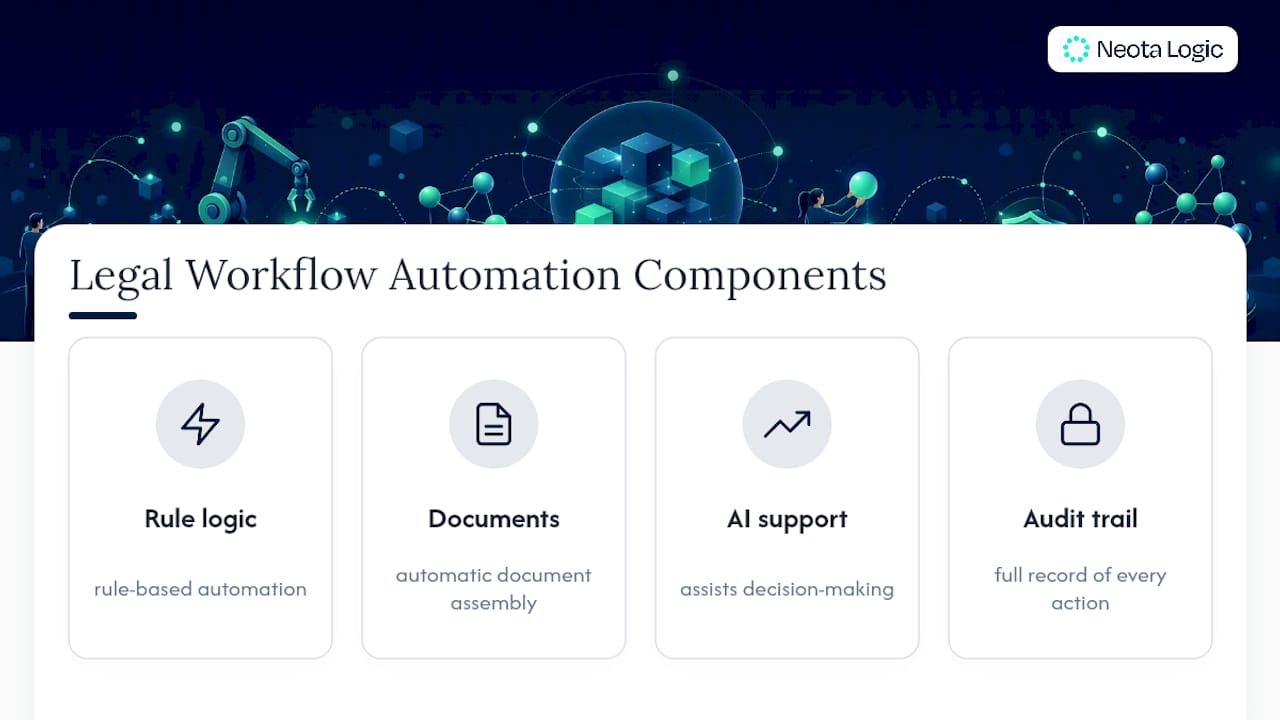
Legal workflow automation is the use of rule-based logic, document assembly, and AI-assisted decision support to move a legal task through defined stages, with a record of who did what and when. It is not a single tool category. It is a layer that sits across your existing legal tech stack and enforces consistency on processes that used to depend on institutional memory and email threads.
Three flavors dominate the market:
- Rule-based workflows apply deterministic if/then logic to routing, approvals, and escalations. A contract above a dollar threshold routes to the general counsel automatically, with no judgment call required.
- Document automation generates contracts, memos, and letters from templates populated by intake data, cutting drafting time on repeatable documents.
- AI-assisted or agentic workflows add a decision-support layer, using language models to extract clauses, flag risk language, or summarize obligations, with a human reviewing the output before it becomes binding.
Legal workflow automation sits adjacent to, but distinct from, contract lifecycle management (CLM) systems, e-discovery platforms, and legal project management tools. CLM often handles the storage and negotiation layer; automation platforms handle the decision logic and routing that CLM systems lack natively. The overlap is real, which is why Bloomberg Law’s analysis stresses vetting tools built by legal domain experts rather than assuming a general-purpose PM tool will hold up under legal-specific requirements like privilege protection and audit trails.
Pro Tip: Map your current tools before you shop for new ones. Most legal ops teams discover they already own a document automation feature buried inside their CLM or DMS that nobody has activated.
What Do Automated Legal Workflow Examples Look Like?
Reading about automation in the abstract rarely convinces a skeptical partner. Concrete templates do. Here are six patterns legal teams commonly deploy first, roughly in order of implementation difficulty.
- Contract lifecycle automation. Intake captures the counterparty and deal terms, the system extracts key clauses automatically, routes the draft to the right reviewer based on risk tier, and tracks redlines through to signature. This is usually the highest-value, highest-complexity workflow, so most teams pilot it last, after simpler wins build confidence.
- Matter intake and conflicts checking. A new matter request triggers an automated conflicts search against existing client and matter data, and only clears for matter creation once conflicts are resolved. This removes a manual bottleneck that otherwise depends on someone remembering to check.
- Client and matter onboarding. Once a matter clears conflicts, onboarding workflows auto-generate engagement letters, populate matter management fields, and notify billing to open a cost center, with no separate email chain required.
- Document generation with e-signature handoff. Templates populate from intake fields, then route directly into an e-signature platform, cutting the gap between “drafted” and “executed” from days to hours on standard documents like NDAs.
- Task routing and deadline management. Triggers based on filing dates, contract renewal windows, or statute deadlines assign owners automatically and escalate reminders as a date approaches, reducing the chance a deadline slips because one person was on vacation.
- Invoice and billing review automation. Time entries and outside counsel invoices route through automated compliance checks against billing guidelines before they hit an approver’s desk, flagging exceptions instead of making a human read every line.
- Compliance monitoring workflows. Scheduled checks against regulatory obligations, policy attestations, or license renewals generate tasks automatically rather than relying on a compliance calendar someone has to remember to open.
Every one of these examples shares a structure: a trigger, a decision point, a routing rule, and a logged outcome. That structure is what separates workflow automation from simply digitizing a form.
What Are the Business Benefits of Legal Workflow Automation?
The efficiency case is real, but it is not unlimited, and the governance case matters just as much to a general counsel who has to defend a decision six months later.
On raw time savings, the Mitratech guide to legal workflow automation puts the realistic range for repeatable legal processes at a 20% to 45% reduction in cycle time. That is a wide band on purpose: a simple intake form redesign lands near the bottom, while a full contract lifecycle overhaul with automated clause extraction can land near the top.
Beyond speed, four benefits tend to matter most to legal ops leaders building a business case:
- Standardization. Every contract routes through the same approval logic, so outcomes stop depending on which paralegal handled the file.
- Governance. Automated workflows generate audit trails by default, timestamping every approval, escalation, and edit.
- Risk reduction. Rule-based routing catches missed approvals and deadline slippage before they become malpractice exposure or a blown filing date.
- Capacity recovery. Time reclaimed from clerical work shifts toward higher-value legal analysis, a shift legal automation research consistently frames as the real payoff, not headcount reduction.
That last point deserves emphasis. The pitch to lawyers should never be “this replaces you.” It should be “this removes the parts of the job you already hate.”
How Do You Implement Legal Workflow Automation Step by Step?
Most failed automation projects don’t fail on technology. They fail on sequencing, buying a platform before anyone has mapped the process it is supposed to fix. Here is the order that works.
1. Assess current processes and capture a baseline. Before touching any software, time your existing process. How long does a standard NDA actually take from request to signature? How many approval steps does a typical matter intake require, and how many of them are redundant? Write these numbers down. Without a baseline, you cannot prove the automation worked, and you cannot secure budget for phase two.
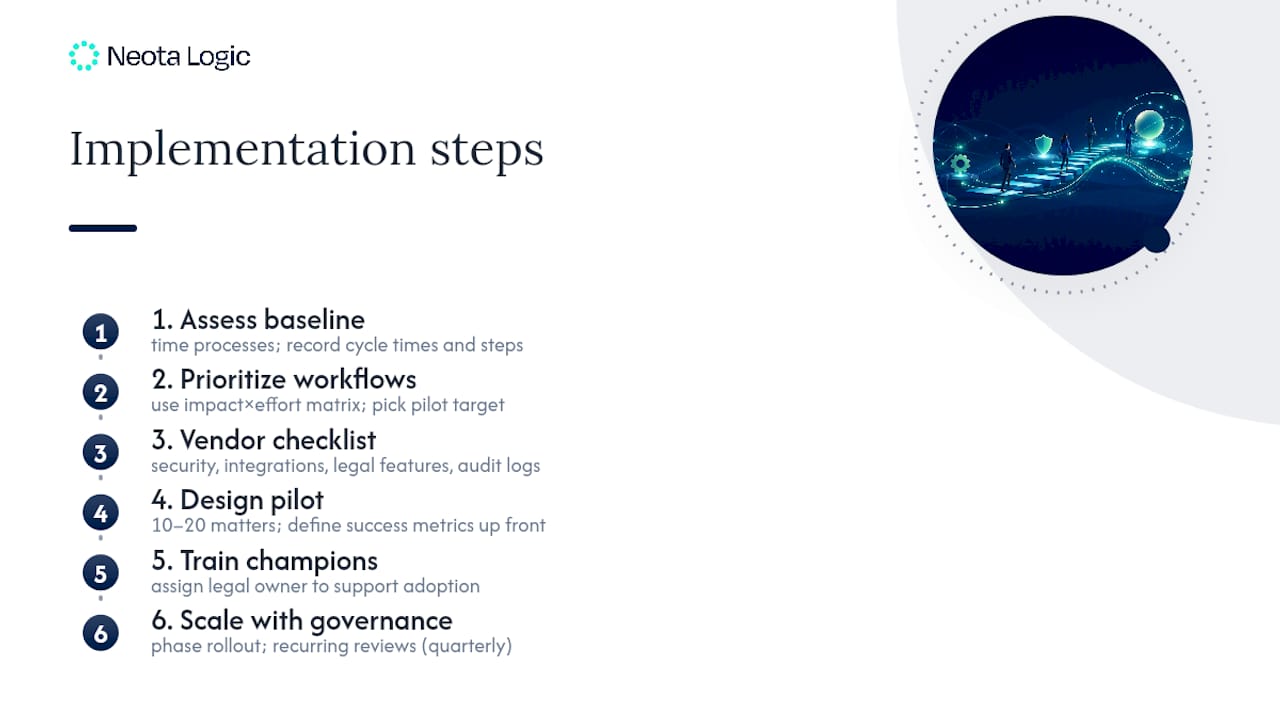
2. Prioritize with an impact-times-effort matrix. Plot every candidate workflow on two axes: how much time or risk it currently costs, and how hard it will be to automate given your current systems. Pick the highest-impact, lowest-effort workflow for your first pilot. Contract intake and document generation for standard templates usually score well here; full contract negotiation workflows usually do not, yet.
3. Build a vendor and solution checklist. Evaluate any platform against four non-negotiables: security posture (encryption, access controls), integration depth with your document management system, legal-specific features rather than generic form-building, and governance capabilities including audit logging. A tool that scores well on user interface but poorly on audit trails is not a legal tool. It is a liability wearing a legal skin.
4. Design a limited pilot. Run the workflow against a controlled dataset of 10 to 20 matters or contracts before rolling it out enterprise-wide. This sample size is large enough to surface edge cases in your decision logic without exposing your whole caseload to an untested process. Define success metrics up front: cycle time reduction, error rate, and user satisfaction among the pilot group.
5. Assign champions and invest in training. Every successful rollout has at least one person on the legal team, not IT, who understands the workflow well enough to answer colleagues’ questions and troubleshoot the first round of edge cases. Skipping this role is the single most common reason adoption stalls after a promising pilot.
6. Scale deliberately, with a governance cadence. Once the pilot clears its success metrics, expand in phases rather than all at once, and set a recurring review cadence (quarterly is common) to audit the workflow’s decision logic against new case types or regulatory changes. Explore Neota Logic’s workflow patterns for how a governed platform structures this phased rollout.
Pro Tip: Run your pilot with the skeptics in the room, not just the enthusiasts. If a workflow survives scrutiny from the partner who hates new software, it will survive contact with the rest of the firm.
What Integration and Security Requirements Matter Most?
Automation that cannot talk to your existing systems creates a second system of record instead of replacing manual work, which is worse than doing nothing.
Document management system integration comes first. Platforms that connect natively to iManage or NetDocuments let automated workflows pull and file documents without forcing lawyers to switch tools mid-task, which is exactly the friction that kills adoption.
Beyond the DMS, verify these before signing anything:
- Email and calendar integration for deadline triggers and notifications, so reminders land where lawyers already work.
- Billing and case management system connections, so time entries and matter data do not require duplicate entry.
- Single sign-on and role-based access control, so permissions match your existing identity management rather than creating a parallel login system.
- Encryption in transit and at rest, plus comprehensive logging of every workflow action for audit purposes.
AI governance deserves its own line item. Gartner has warned that a substantial share of agentic AI projects risk cancellation when organizations skip governance planning. Any platform using AI for clause extraction or risk flagging needs a human-in-the-loop checkpoint before output becomes a decision, plus the ability to route between multiple AI models rather than locking you into one vendor’s judgment.
Governance is not a brake on automation speed. It is the reason the speed survives scrutiny. A workflow that moves fast but leaves no audit trail is not an efficiency gain, it is a liability with a shorter runway.
How Do You Measure ROI on Legal Workflow Automation?
Five metrics cover most of what a legal ops leader needs to report to leadership, and none of them require exotic tooling to track.
| Metric | What to measure |
|---|---|
| Cycle time | Time from workflow trigger (intake, request) to completion, compared against your pre-automation baseline. |
| Percentage of tasks automated | Share of total workflow steps handled without manual intervention, tracked per workflow type. |
| Error and exception rate | Frequency of flagged exceptions, missed approvals, or rework requests per hundred matters. |
| Time-to-value | Elapsed time from pilot launch to measurable cycle-time improvement, a figure procurement will ask for directly. |
| Adoption rate | Percentage of eligible matters routed through the automated workflow versus handled manually. |
Instrument these from day one of the pilot, not after scaling, since retrofitting measurement onto a live workflow is far harder than building it in. A simple quarterly cadence works for most legal teams: report cycle time and adoption in quarter one, add error rate once volume is high enough to be statistically meaningful, and layer in time-to-value once you have a full quarter of pre- and post-automation comparison. The CLOC state-of-the-industry benchmarking offers a useful external reference point when leadership asks whether your numbers are competitive.
What Does a Governed Automation Pilot Look Like in Practice?
A pattern worth borrowing: start narrow, govern tightly, and measure before you expand. Legal teams working with Neota Logic’s governed workflow model typically structure a pilot around a single high-friction process, such as intake triage or a defined compliance check, rather than attempting to automate an entire department’s workload in one pass.
The governance controls that make this defensible include:
- A fixed pilot scope, following the same 10 to 20 matter sample size that industry guidance recommends for calibration.
- Multi-model AI orchestration, so no single vendor’s model has unchecked authority over a legal decision.
- Full audit logging of every routing decision, approval, and AI-assisted recommendation.
- A human-in-the-loop checkpoint before any AI-generated output becomes a binding action.
The measurable outcomes legal ops teams report from this pattern center on two figures: reduced turnaround time on the piloted process and higher user engagement with the resulting workflow, since lawyers trust a system they can see audited and explained. Multi-model orchestration also reduces vendor lock-in risk, letting a legal team swap underlying AI models as regulatory guidance or model quality shifts, without rebuilding the governance layer around it.
What Do Practitioners Get Wrong About Legal Workflow Automation?
The most common failure mode isn’t technical. It’s sequencing. Teams buy an enterprise platform, skip the pilot entirely, and try to automate their most complex workflow first because it looks like the biggest win on paper. It rarely is. Complex workflows have more edge cases, more stakeholders, and more ways for a rollout to stall in week three when the first exception nobody planned for shows up.
The second failure is treating integration as an afterthought. A workflow that requires lawyers to copy data between two systems has not been automated. It has been relocated.
The third, and most expensive, is under-investing in training and assuming a slick interface will sell itself. It won’t. A partner who has run the same intake process for twenty years needs a reason to trust a new one, and that reason comes from a champion who can answer questions in real time, not from a vendor’s onboarding email.
If you take one thing from this guide into your next budget pitch: start with a bounded pilot, measure the baseline before you touch anything, and build the audit trail in from day one rather than bolting it on after legal asks for one.
Where Does Neota Logic Fit Into Your Automation Plan?
If the workflows above sound right for your team but the idea of stitching together five disconnected tools sounds exhausting, that’s precisely the gap Neota Logic is built to close. Rather than forcing legal ops to choose between AI speed and governance, Neota Logic orchestrates multiple AI models inside a single governed workflow layer, so every decision, from matter intake triage to compliance monitoring, carries an audit trail and a human checkpoint by design.
That governance layer is what separates a demo that impresses a committee from a platform that survives a compliance review two years later. Neota Logic fits naturally into the workflows this guide covers: contract intake and routing, matter triage, and ongoing compliance checks, each configurable without custom code, and each integrated with the document management and identity systems your team already runs. You can review how the platform structures these governed workflows on the Neota Logic platform page, or explore how legal teams have applied it directly on the legal teams overview. If a bounded pilot is the right next step for your organization, as this guide recommends, request a demo and walk through a pilot design scoped to your own 10 to 20 matter test set.
Sources
- Legal Workflow Automation in 2026: What’s Working and What’s Hype? - Bloomberg Law
- The Mitratech Guide to Legal Workflow Automation
- Contract Corridor: Best legal workflow automation tools
- Gartner: agentic AI project cancellation risk (2025)
FAQ
What Is Legal Workflow Automation?
It is the use of rule-based logic, document assembly, and AI-assisted decision support to move a legal task through defined stages with a full audit trail of every action taken.
How Long Should a Legal Workflow Pilot Run?
Most implementation guidance recommends testing against 10 to 20 matters or contracts, enough to surface edge cases in decision logic without exposing your full caseload.
### How Much Time Can Legal Workflow Automation Save?
Is Neota Logic Suitable for Compliance Monitoring Workflows?
Yes. Neota Logic’s governed workflow platform supports compliance monitoring alongside intake triage and contract lifecycle automation, with audit logging and human-in-the-loop checkpoints built in.
What Should You Check Before Choosing a Legal Automation Vendor?
Verify security posture, document management system integration depth, legal-specific functionality, and governance features like audit trails before signing a contract.
Recommended
Ready to make your AI workflows defensible?
Book a demo and we'll walk one of your real processes through Neota.
Book demo