This page gives you copy-ready legal intake form examples you can adapt today: a general template, practice-area snippets, and format options for PDF, web forms, and intake portals. The fastest path is to download the general template below or paste the web-form fields directly into your practice management system.
Doing this before your first client call delivers three immediate gains:
- Faster conflict checks, because names and adverse parties are captured before the consultation
- Sharper case evaluation, since matter facts arrive in a structured format instead of a rambling voicemail
- Fewer wasted consultations, because unqualified or conflicted matters get flagged early
Key Takeaways
Effective legal intake forms combine a structured core template, practice-area specific fields, pre-consultation timing, and governance controls that scale from a single PDF to an enterprise Legal Front Door.
| Point | Details |
|---|---|
| Send forms early | Complete intake before the consultation so attorneys can run conflict checks in advance. |
| Build one core template | Use a general structure with identifying info, matter facts, conflicts, and fee acknowledgment. |
| Layer in practice-area fields | Add snippets for personal injury, family law, immigration, or corporate matters as needed. |
| Protect against risk | Include non-engagement disclaimers and limit sensitive data fields to what’s necessary. |
| Scale deployment with volume | Move from PDF or web forms to a governed platform like Neotalogic as request volume grows. |
Table of Contents
- Legal Intake Form Examples You Can Copy Today
- What Fields Belong on Every Intake Form?
- Best Practices for Sending and Structuring Intake Forms
- How Intake Forms Change by Practice Area
- Choosing How to Deploy Your Intake Form
- Does Governed Intake Actually Improve Triage?
- What Actually Makes an Intake Form Work
- Where Neotalogic Fits Once Intake Outgrows a Form
- Sources
- FAQ
Legal Intake Form Examples You Can Copy Today
A general-purpose legal client intake form breaks into five blocks, and every template worth using follows roughly this order: identifying information, matter summary, conflicts disclosure, fee acknowledgment, and consent/signature. That structure isn’t arbitrary. A well-built intake template captures identifying data, matter background, conflicts, fee language, and a non-engagement notice in that sequence because each section depends on the one before it, and attorneys need conflicts resolved before they discuss fees.
Here’s what the core structure looks like in practice:
| Section | Fields to Include |
|---|---|
| Identifying block | Full legal name, date of birth, address, phone, email, preferred contact method, referral source |
| Matter summary | Brief description of the issue, relevant dates, opposing parties, jurisdiction, desired outcome |
| Conflicts screening | Names of all parties involved, related entities, prior representation by the firm |
| Fee acknowledgment | Fee structure disclosure, retainer requirement, billing preference, engagement scope checkbox |
| Consent and signature | Confidentiality notice, non-engagement disclaimer, electronic signature field, date |
Once that skeleton is in place, practice-area snippets bolt on cleanly. A personal injury firm appends incident date and insurance carrier fields; a family law practice adds custody and relationship-date fields. You don’t need five separate forms from scratch, just one core template plus modular add-ons.

On format, most firms end up running two versions in parallel: a fillable DOCX or PDF for email intake and walk-ins, and a web form for the contact page. Tools like Jotform let you build the web version with drag-and-drop fields, conditional logic, and e-signature capture, and most practice management platforms accept a direct paste or CSV import of these fields so you’re not re-keying data twice.
What Fields Belong on Every Intake Form?
Before you finalize any template, run it against this checklist. Skipping any of these items is the single most common reason intake forms fail to do their job.
- Identifying information and contact preference. Full name, date of birth, phone, email, and a field for how the prospective client wants to be reached back.
- Matter facts, dates, and parties. A short narrative field, key dates (incident, notice, filing deadlines), jurisdiction, and every party or entity involved.
- Conflict screening questions. Names of adverse parties, related companies, and any prior contact with your firm or its attorneys.
- Billing and fee acknowledgment. Fee structure, retainer amount if applicable, and a checkbox confirming the client understands the engagement scope before work begins.
- File uploads and consent checkboxes. A place to attach contracts, medical records, or correspondence, plus explicit consent to store and use that information.
- Non-engagement and confidentiality disclaimers. Language making clear that submitting the form does not create an attorney-client relationship.
That last point matters more than most firms realize. Multiple free intake templates build in an explicit non-engagement disclaimer precisely to prevent a prospective client from assuming representation exists before a conflicts check clears and an engagement letter is signed.
Pro Tip: Add a referral-source field even though it feels like a marketing question, not a legal one. It costs the client ten seconds to answer and gives your firm the only reliable data on which referral relationships or ad channels actually convert.
Best Practices for Sending and Structuring Intake Forms
Timing decides most of what happens next. Forms completed before the initial consultation let attorneys run a conflicts check and walk into the meeting ready to discuss strategy instead of collecting basic facts. Send the form the moment a prospective client books a call, not after.
Design matters almost as much as timing:
- Mark only the truly necessary fields as required; everything else should be optional or hidden behind conditional logic.
- Use conditional logic to skip irrelevant sections, so a corporate client never sees custody-related questions.
- Match fee language on the form word-for-word with your engagement letter. A mismatch here is a common source of client disputes later.
- Limit sensitive data fields to what the matter actually requires. Collecting a Social Security number for a contract dispute invites unnecessary risk.
Vendor research on intake tools shows dynamic, well-structured forms reduce errors and speed up onboarding compared to static paper intake. The most common mistakes are missing conflicts fields entirely, vague fee language that doesn’t specify hourly versus flat versus contingency, and long open-text boxes that invite rambling instead of structured answers.
How Intake Forms Change by Practice Area
The core template stays constant. What changes is a small set of practice-specific fields layered on top:
- Personal injury: date of incident, medical treatment received, insurance carrier and policy number.
- Family law: relationship start and separation dates, custody or visitation arrangements, existence of any protective orders.
- Immigration: current immigration status, country of origin, prior filings, and upcoming deadlines.
- Corporate and contract matters: counterparties to the agreement, key dates and renewal terms, and the specific remedy or scope of review requested.
Use conditional logic or a short supplemental questionnaire to trigger these fields only when relevant, rather than building five separate monolithic forms. A prospective client who selects “family law” as the matter type should never see personal injury fields at all.
Choosing How to Deploy Your Intake Form
Match the deployment method to your firm’s size and volume, not to whatever tool happens to be easiest to set up this week.
- Quick deploy: a fillable Word or PDF sent by email. Fast to build, zero cost, but manual data entry and no automatic routing.
- Scale: a web form with conditional logic, file uploads, and e-signature. Form builders handle this without custom development, and submissions can create a matter directly in many practice management systems.
- Enterprise: a governed intake platform, often called a Legal Front Door, for internal legal teams fielding requests from business units. This layer prioritizes triage, analytics, and governance over simple form collection.
Whichever path you pick, check integration points before committing: does the form connect to your practice management system, your CRM, your e-signature tool, and whatever reporting dashboard your firm already uses? A form that lives in isolation just creates a second data-entry step nobody asked for.
Does Governed Intake Actually Improve Triage?
The evidence points to yes, particularly once volume outgrows a single paralegal’s inbox.
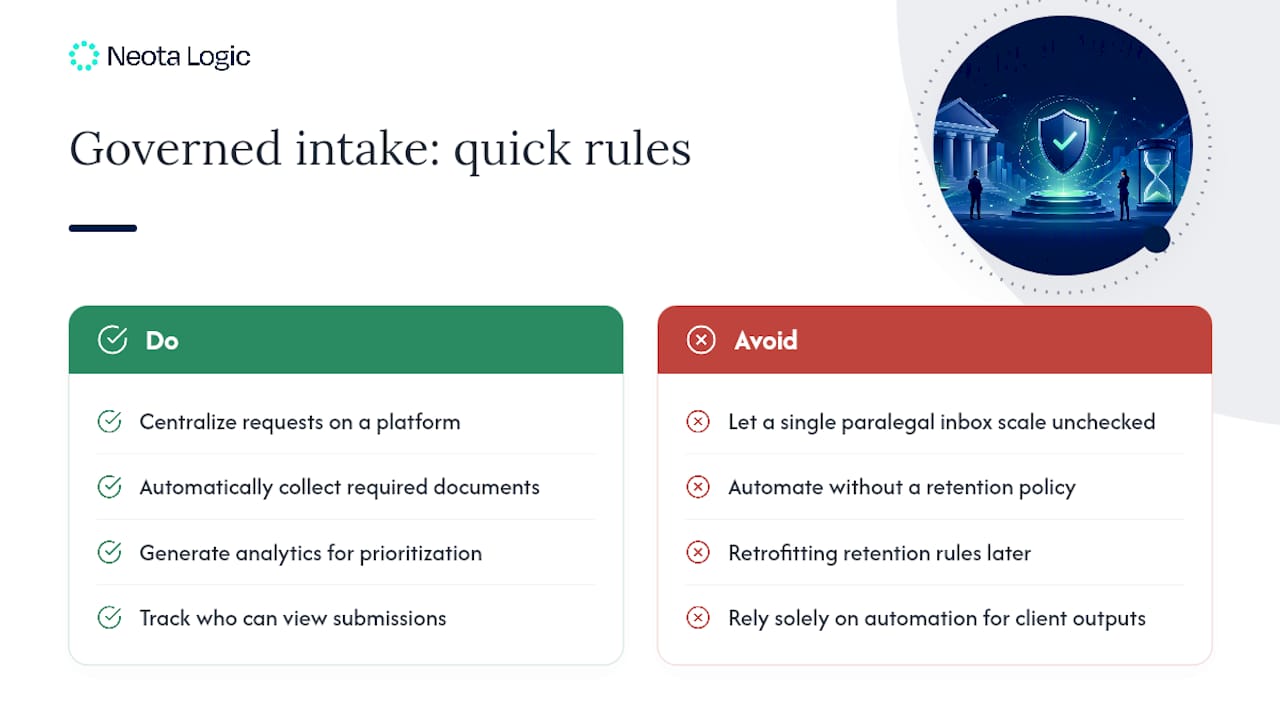
Digital Legal Front Door platforms centralize incoming requests, collect required documents automatically, and generate the analytics legal teams need to prioritize workload and demonstrate impact.
Deloitte’s research on Legal Front Door design outlines five implementation approaches ranging from a shared mailbox to a full enterprise platform, so smaller teams aren’t locked out of the benefits. Governance still applies at any scale: track who can view submitted data, log every triage decision for audit purposes, and keep a human reviewing any automated recommendation before it reaches a client.
Pro Tip: Before automating any part of intake, write down your data retention policy first. Retrofitting one after submissions start piling up is far harder than setting the rule on day one.
What Actually Makes an Intake Form Work
Enforce pre-consultation completion and run the conflicts check before the call, not after. That single rule fixes more onboarding friction than any field redesign.
Where Neotalogic Fits Once Intake Outgrows a Form
A template solves intake for a solo practitioner or small firm. It stops working once an in-house legal team is fielding hundreds of requests a month from business units that all expect a fast, consistent response. That’s the gap Neotalogic closes: governed workflows that classify and route incoming legal requests automatically, apply your team’s own decision logic, and log every action for audit purposes.
Instead of choosing one AI model and living with its limitations, Neotalogic orchestrates multiple models under human oversight, so your legal team keeps control over sensitive decisions while routine triage runs on its own. Firms using this approach report measurable gains in turnaround time and staff engagement once intake stops eating hours that should go to substantive legal work. If your intake volume has outgrown a Word template, book a demo and see how governed automation handles the load your current form can’t.
Sources
- Designing Your Legal Front Door: Five Approaches to Meet Different Needs
- Why fill out intake forms
- Law Firm Intake Form Template: Free, Editable, ABA-Aligned
- Legal Client Intake Form template | Jotform
- Free Law Firm Client Intake Form Template and Best Practices
FAQ
What Is a Legal Intake Form?
A legal intake form is a structured questionnaire that collects a prospective client’s identifying information, matter facts, and conflicts data before an attorney takes on the case.
What Does an Intake Form Look Like?
A typical form has five sections: identifying information, matter summary, conflicts screening, fee acknowledgment, and a consent or signature block, often delivered as a PDF, DOCX, or web form.
What Are Common Mistakes on Intake Forms?
The most frequent errors are missing conflicts fields, vague fee language that doesn’t specify hourly versus flat versus contingency, and long open-text boxes that produce rambling answers instead of structured data.
How Do I Create My Own Intake Form?
Start with the general template structure covered above, add practice-area specific fields, and choose a format (PDF, web form, or intake portal) that matches your firm’s volume and integration needs. Firms handling higher volumes often move toward governed platforms like Neotalogic to add automated triage and audit trails on top of the same core fields.
Recommended
Ready to make your AI workflows defensible?
Book a demo and we'll walk one of your real processes through Neota.
Book demo