Law firm workflow automation means using software to trigger, route, and log the repetitive steps of legal work, intake, document assembly, approvals, reminders, so lawyers spend less time on administration and more on judgment calls that require a license to make. The single best first move is not a firmwide rollout. It’s a 30-day pilot on one high-volume, low-risk workflow, matter intake or document generation, are the usual candidates, with clear success metrics defined before you start.
The evidence for starting narrow rather than broad is consistent. Legal-specific coverage points to intake, matter opening, and document handling as the areas where automation delivers the fastest, most measurable value, and durable execution platforms built for legal work typically move from pilot to production in 8 to 12 weeks once the initial 30-day test proves out. A governed platform like Neota Logic exists precisely for firms that want that pilot to be auditable from day one, not retrofitted with logging after the fact.
What a well-run 30-day pilot typically shows:
- Measurable time savings on the piloted workflow, often visible within the first two weeks.
- Fewer missed handoffs between intake staff, associates, and partners.
- A complete audit trail showing who approved what and when, ready for compliance review.
Key Takeaways
Successful law firm workflow automation starts with a narrow, measurable pilot on a high-volume process, not a firmwide platform rollout.
| Point | Details |
|---|---|
| Start with one workflow | Pilot intake, document assembly, or docketing for 30 days before expanding scope. |
| Match platform to firm size | Small firms fit Zapier or IFTTT; enterprise legal teams need governed platforms with audit logging. |
| Build governance in from day one | Role-based approvals, immutable audit trails, and human-in-the-loop gates aren’t optional add-ons. |
| Measure before you scale | Track cycle time, error reduction, and adoption rate to justify expanding automation scope. |
| Neota Logic fits governed AI pilots | Neota Logic pairs no-code workflow design with governed multi-model AI and full audit trails for legal teams. |
Table of Contents
- What Law Firm Workflow Automation Actually Requires
- Which Workflows Should Firms Automate First?
- How Do You Roll Out Automation Without Disrupting Practice?
- What Governance Controls Does Legal Automation Need?
- What Does Automation ROI Look Like for a Law Firm?
- What Are the Biggest Automation Mistakes Firms Make?
- How Neota Logic Ran a Governed Automation Pilot
- What This Guide Gets Right That Most Automation Advice Misses
- Where to Start With Neota Logic
- Sources
- FAQ
What Law Firm Workflow Automation Actually Requires
Not every automation tool belongs in a law office. The category splits into four distinct types, and picking the wrong one is the most common reason firms abandon automation projects within the first year.
Legal-specific governed platforms are built around the profession’s actual constraints: privilege, conflicts, ethical walls, and the need for a defensible record of every automated decision. These platforms bake in human-in-the-loop gates so an AI-assisted triage or document draft never goes out the door without a lawyer’s sign-off. Neota Logic sits in this category, pairing no-code workflow design with governed AI orchestration so firms can automate decision logic, not just task routing.
Enterprise workflow engines handle high-volume, cross-department processes at scale, think large corporate legal departments coordinating with procurement, HR, and finance. They offer strong governance but usually demand more implementation time and a dedicated internal team to maintain them.
Integration platforms, also called iPaaS tools, connect existing systems rather than replacing them. Microsoft Power Automate is the clearest example here: it ships with a large connector library for Office 365 and enterprise systems, letting a firm automate email routing, calendar triggers, and SharePoint document flows without writing code. Zapier and IFTTT occupy a similar space for smaller firms, connecting apps like Gmail, Google Calendar, and e-signature tools through simple trigger-action recipes.
Lightweight connectors and scripting tools sit at the DIY end. Google’s Apps Script lets a tech-savvy paralegal or IT contact automate tasks inside Google Workspace and pull in outside services, while open-source options like n8n appeal to firms that want self-hosted control over data residency. Both trade convenience for maintenance burden.
Match the category to your firm’s profile:
- Solo and small firms with straightforward intake volume: start with Zapier or IFTTT for simple connector work.
- Mid-size firms juggling multiple practice areas and compliance obligations: look at legal-specific platforms or Power Automate for deeper Office 365 integration.
- Enterprise legal departments: prioritize governed platforms with audit logging and multi-model AI flexibility over general-purpose connectors.
Which Workflows Should Firms Automate First?
Practice-area specifics matter more than generic advice here. Some workflows are obvious pilot candidates because they’re high-volume, repetitive, and low-risk if something goes slightly wrong during testing.
New matter intake and triage. A client inquiry arrives by web form or email, the workflow classifies it by practice area and urgency, routes it to the right intake attorney, and drafts an engagement letter for review. The human gate sits before the letter goes out. The audit log captures every routing decision.

Document assembly with review handoff. A trigger, say, a signed retainer, kicks off template selection and clause assembly, then hands the draft to an associate for review before it moves to the client. Case management software like Clio Manage or Smokeball often anchors this step, since both already store matter data that templates can pull from.
Docketing and deadline reminders. Court dates and statutory deadlines feed an automated reminder cascade, escalating to a supervising partner if a deadline goes unacknowledged. Missed deadlines are one of the costliest failure modes in practice, which makes this a strong ROI case.
Real estate closing checklists. Title work, disclosures, and signature routing through tools like Litera Transact or Ironclad move in sequence, with automated status updates to all parties.
Probate and estate planning intake. Client questionnaires trigger document drafting logic based on family structure and asset type, a good fit for practice-management suites like Actionstep.
Each of these shares three traits: high transaction volume, repeatable structure, and a clear point to measure success (cycle time, error rate, missed deadlines). Integration touchpoints typically include your document management system, calendar, e-signature tool, and practice management platform. Firms exploring document automation usually start exactly here.
How Do You Roll Out Automation Without Disrupting Practice?
A realistic rollout follows four steps, and skipping any one of them is why so many automation projects stall after the pilot.
- Identify and prioritize. Score candidate workflows on volume, error rate, and business impact. A workflow that runs 200 times a month with a 15% error rate outranks one that runs twice a week, even if the second feels more urgent.
- Map the process. Document every data source, handoff, approval, and exception path before building anything. Capture the SLAs, how fast must an intake response go out, and note where audit trails need to exist for compliance.
- Design and run the pilot. Build the smallest version that proves the integration shape and the audit trail work end to end. Define success metrics before the pilot starts, not after: time saved, cycle time, adoption rate among staff.
- Measure and iterate. Compare pilot results against your baseline. If the metrics hold, expand scope to adjacent workflows. If they don’t, diagnose whether the failure is technical, in the integration, or human, in adoption, before scrapping the approach.
Concrete metrics worth tracking from day one:
- Average cycle time for the piloted workflow, before and after.
- Number of manual handoffs eliminated.
- Missed deadline or error rate change.
- Staff adoption rate, measured as percentage of eligible matters routed through the new workflow rather than the old manual process.
Firms that skip the mapping step tend to discover mid-pilot that their document management system doesn’t expose the data the workflow needs, which turns a 30-day pilot into a 90-day scramble. Map first. The Neota Logic workflows guidance walks through this mapping exercise in more depth for teams building their first pilot.
What Governance Controls Does Legal Automation Need?
Automating legal work without governance controls is how firms end up explaining to a bar association why an AI-drafted communication went to a client without review. The controls that matter aren’t optional extras, they’re what separates production-grade automation from a fragile script.
Core controls to build in from the start: role-based approvals so only authorized staff can trigger or approve sensitive steps, immutable audit logs that record every automated action and who signed off on it, data residency and encryption controls matching your jurisdiction’s requirements, and human-in-the-loop gates before any ethically sensitive decision, conflict clearance chief among them. Durable workflow engines treat these approval steps as first-class parts of the process, not bolted-on checkpoints, which is what makes the resulting automation defensible under audit.
When AI enters the picture, the caution deepens. Automation and AI-driven decisioning are not the same thing, and treating AI outputs as a governed decision-support layer rather than an autonomous decision-maker is the difference between a useful tool and a malpractice exposure.
Vendor due-diligence questions worth asking before signing anything:
- How are audit logs structured, and can they be exported for a compliance review?
- What model governance exists if AI is involved in any decision point?
- Is client data isolated per-matter, and where does it reside?
- What’s the SLA for human approval windows before an automated action executes?
Pro Tip: Structure your approval gates so a human reviews the exception, not every routine instance. Automation that requires sign-off on every single output defeats its own purpose, but automation with zero human checkpoints on judgment calls is a liability waiting to surface.
What Does Automation ROI Look Like for a Law Firm?
The math is simpler than most firms expect. ROI on a workflow automation pilot follows one formula: (time saved × billable or operational rate) minus total implementation cost. If an intake workflow saves each of six intake staff two hours a week, and their fully loaded cost runs $40 an hour, that’s roughly $2,000 a month in recovered capacity, against a pilot cost that a 30-day, single-workflow test usually keeps modest.
Cost components to budget for: platform licensing, integration work connecting the automation to your DMS and practice management system, pilot delivery time from whoever configures the workflow, change management, training staff on the new process, and ongoing support once the pilot graduates to production.
Metrics worth presenting to partners or general counsel when building the business case:
- Reduction in manual touchpoints per matter.
- Average cycle time improvement, measured start to finish.
- Decrease in missed deadlines or filing errors.
- Staff adoption rate across the piloted workflow.
Firms that pilot on intake specifically tend to see the fastest measurable wins, since intake and matter-opening flows are high-volume and repeatable enough to produce a clean before-and-after comparison within a single month.
What Are the Biggest Automation Mistakes Firms Make?
Overautomation is the most common failure. Firms try to automate an entire practice area at once instead of proving one workflow first, and the resulting mess makes it hard to isolate what actually broke.
Watch for these red flags during vendor selection and deployment:
- Vendor lock-in through proprietary formats that make switching platforms later expensive.
- Poor exception handling, workflows that break silently when a case doesn’t fit the template.
- Automating a broken process, which just makes bad practice run faster.
- Insufficient change management, rolling out new tools without training staff on why the process changed.
The fix is unglamorous: keep humans in every ethically sensitive decision, start pilots small, build a clear rollback path before you need it, and budget real time for training rather than assuming staff will absorb a new workflow by osmosis.
How Neota Logic Ran a Governed Automation Pilot
Neota Logic’s typical deployment blueprint follows a consistent shape across client engagements: discovery and system mapping first, understanding existing intake and document flows before touching any configuration, followed by a focused pilot on intake or triage, the same starting point the broader research on legal automation consistently recommends. Human-in-the-loop gates and audit logging get built in from the pilot stage, not added later, and scaling happens only once KPIs tied to specific workflow owners show the pilot is working.
A governed workflow platform treats every AI-assisted decision point and every human approval as a first-class step in the process, logged and reviewable, rather than an invisible shortcut buried inside a script.
That design choice is what separates durable automation from brittle scripting. Firms working with Neota Logic’s legal team solutions have used this approach to cut manual triage time and improve turnaround visibility across matter types, while keeping a full audit trail available for compliance review at any point.
Governance features worth noting in this kind of deployment:
- Multi-model AI flexibility, avoiding dependence on a single AI vendor.
- Immutable audit trails covering every automated and human-approved action.
- Approval nodes treated as workflow steps, not afterthoughts bolted onto the process.
The result firms consistently report is a system where automation handles volume and routing, while lawyers retain the judgment calls that actually require a law license.
What This Guide Gets Right That Most Automation Advice Misses
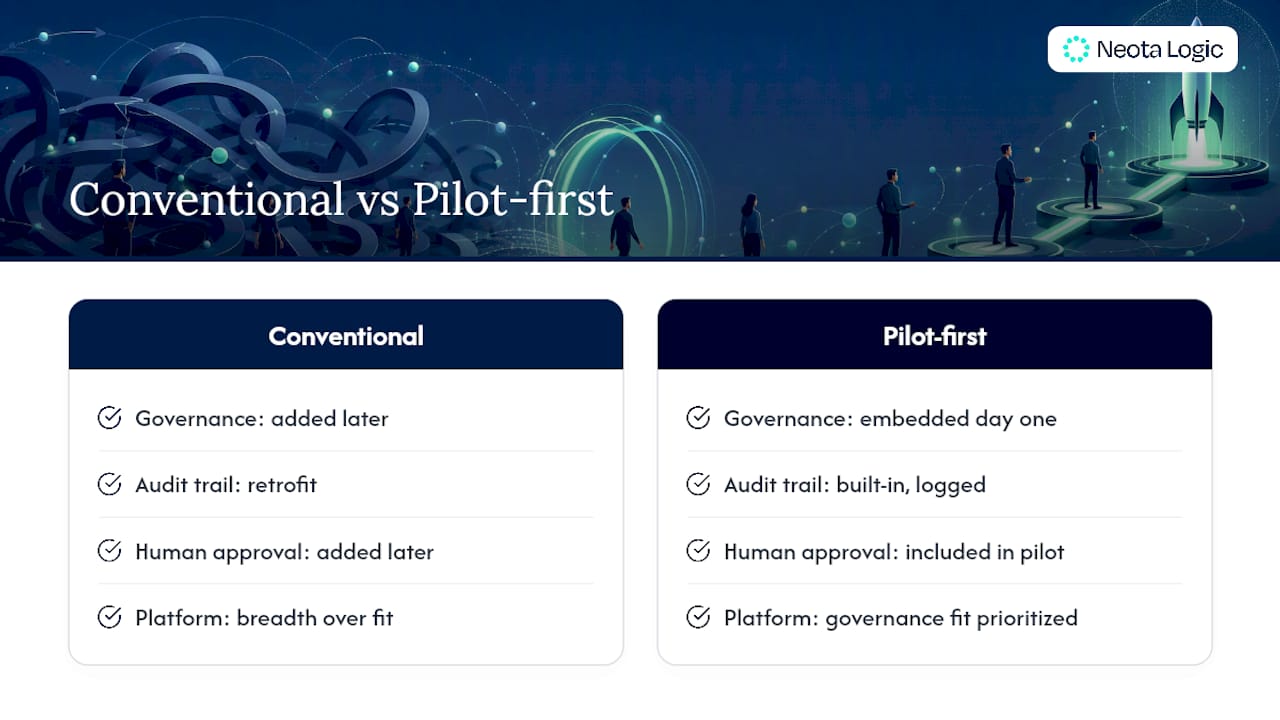
Most automation advice treats law firms like any other business process, map it, automate it, done. That’s backwards for legal work, and it’s why so many firms get burned on their first attempt. The conventional advice underweights governance until after something goes wrong, treating audit trails and human approval gates as compliance paperwork to add once the automation “works.”
That ordering is the mistake. A workflow that automates a client intake decision without a defensible, logged approval step isn’t more efficient, it’s a liability sitting quietly until a bar complaint or malpractice claim surfaces it. The firms getting real value from automation build the audit trail and the human gate into the pilot from day one, not as a retrofit.
The other overlooked point: practice area specificity beats generic automation platforms almost every time. A connector tool that works beautifully for a marketing team’s lead routing will handle conflict checks and privileged document review far less carefully. Firms should prioritize governance fit over feature breadth when they pick a platform, then worry about scale.
Where to Start With Neota Logic
Neota Logic gives law firms and corporate legal teams a way to pilot governed automation without betting the whole department on a single vendor’s AI model. Instead of choosing between a rigid integration tool and an AI system with no audit trail, firms get no-code workflow design, multi-model AI flexibility, and immutable logging built into the same platform from the first pilot.
That combination matters most for the exact use case this guide walks through: a 30-day intake or triage pilot that needs to prove itself on real metrics before anyone commits to scaling it. Neota Logic’s approach lets legal ops managers and general counsel start narrow, keep every automated decision reviewable, and expand scope only when the numbers justify it, without locking into a single AI vendor along the way.
If your firm is ready to map its first pilot workflow, the Neota Logic platform overview walks through what a governed, no-code deployment looks like end to end, and how to request a demo scoped to your practice mix.
Sources
- Elevate Your Law Firm: Workflow Automation Tools That Transform Practice
- Automate conflict checks, intake, and matter opening | Agaro
- Power Automate connectors
- Neota Logic Platform
FAQ
What Is the 80/20 Rule for Lawyers?
Is $900 an Hour a Lot for a Lawyer?
Rates that high sit at the far end of the market and typically reflect specialized expertise or elite firm positioning rather than a standard billing rate; automating routine administrative work is one lever firms at any rate level use to protect billable hours for higher-value tasks.
How Do Lawyers Build a High-Revenue Practice?
Beyond rate and caseload, firms scaling revenue typically focus on reducing non-billable administrative drag through automation, intake, document generation, and reminders, freeing attorney time for client work and higher-value matters.
What Are Examples of Workflow Automation in a Law Firm?
Common examples include automated matter intake and triage, document assembly with review handoffs, docketing and deadline reminder cascades, e-signature routing for closings, and governed AI-assisted decision support through platforms like Neota Logic.
How Long Does a Law Firm Workflow Automation Pilot Take?
A focused pilot on one workflow typically runs about 30 days, with production cutover for durable, auditable systems usually landing in the 8 to 12 week range once the pilot proves out.
Recommended
Ready to make your AI workflows defensible?
Book a demo and we'll walk one of your real processes through Neota.
Book demo