Document automation for legal teams replaces manual drafting with software-driven document generation, pulling structured data into pre-approved templates or clause libraries to produce consistent, compliant output in a fraction of the time.
The sections below cover the two main technical approaches, a phased implementation roadmap, governance controls, KPIs, common pitfalls, and how AI-governed orchestration raises the ceiling on what legal document automation can deliver.
Key Takeaways
Document automation for legal teams delivers durable gains only when governance, template stewardship, and structured measurement are built into the program from the start, not added after the pilot.
Table of Contents
- What is document automation in a legal context?
- What do law firms actually gain from automating documents?
- Which document types and practice areas benefit most?
- How do you implement document automation without creating more problems?
- What should legal teams evaluate when choosing a platform?
- How do you maintain control after automation is live?
- How do you measure whether document automation is working?
- What are the most common reasons legal automation pilots fail?
- How AI-governed orchestration raises the ceiling on legal document automation
- An editorial perspective on what legal automation actually requires
- Neotalogic’s approach to governed legal document automation
What is document automation in a legal context?
Legal document automation is the practice of encoding drafting logic, approved language, and conditional rules into software so that a completed document is generated from structured inputs rather than assembled by hand. Two primary approaches dominate legal practice.
Q&A / template-driven automation
A user answers a guided questionnaire. The software maps each answer to a variable or conditional block inside a master template, then produces a finished document.
This approach suits high-volume, relatively standardized documents where the drafting logic is stable and the variables are predictable.
Clause-based / component assembly
Instead of a single master template, the system holds a library of pre-approved clause modules. A user or automated rule set selects and sequences the right clauses for the specific transaction type, jurisdiction, or risk profile.
Clause assembly is better suited to complex, high-variability documents where a single template cannot accommodate all permutations without becoming unmanageable.
How automation differs from DMS and CLM
A document management system (DMS) stores, retrieves, and versions completed documents. A contract lifecycle management (CLM) platform manages the full contract workflow from request through execution, obligation tracking, and renewal. Document automation sits upstream of both: it generates the document that the DMS stores and the CLM manages. The three systems are complementary, not interchangeable, and the strongest legal technology stacks integrate all three.
Comparing the two approaches for law-firm use cases
Q&A/template-driven automation is fast to deploy, easy for non-technical users, and requires low training overhead. Clause-based assembly handles complex transactions cleanly, and clause updates propagate across all documents using that module.
What do law firms actually gain from automating documents?
The gains from legal document automation are concrete and measurable across several operational dimensions.
Practice areas where the gains are largest include corporate transactional work (NDAs, shareholder agreements, board resolutions), employment law (offer letters, separation agreements, policy documents), real estate (lease agreements, disclosure packs, title-related correspondence), and litigation intake (court forms, demand letters, matter intake packets). Thomson Reuters documents how tax and accounting professionals structure workflows to reduce manual tasks and improve consistency, a pattern that maps directly to legal drafting workflows where repetitive, rules-based output is the norm.
Professional services teams that apply AI-assisted guided workflows to repetitive review tasks report material improvements in throughput and output consistency, according to Thomson Reuters’ case study on CoCounsel Tax and Audit. The same governance principles apply to legal document generation.
Which document types and practice areas benefit most?
Not every document is worth automating. The highest-return targets share two characteristics: they are produced frequently, and their drafting logic is stable enough to encode.
For a pilot, the highest-return quick wins are engagement letters and NDAs. Both are high-frequency, well-understood in structure, and carry low drafting risk if the template is correctly approved. A two-week pilot on either document type will generate enough volume to measure time savings and adoption rates before committing to a broader rollout.
How do you implement document automation without creating more problems?
Implementation fails most often not because the technology is wrong, but because the rollout skips the audit phase, underestimates change management, or launches too broadly before the templates are tested. A phased approach prevents all three.
Stakeholder roles: Legal operations leads the project and owns template governance. IT manages integrations and security configuration. Compliance reviews templates for regulatory alignment. Procurement handles vendor contracting. Practice group leaders champion adoption within their teams.
Pro Tip: Scope the pilot to a single document type and a single practice group. Resist the pressure to automate everything at once. A narrow pilot generates clean data, surfaces integration issues early, and builds internal credibility before you commit to a full rollout. Template debt, the accumulation of outdated or poorly tested templates, is almost always the product of launching too broadly too fast.
What should legal teams evaluate when choosing a platform?
Vendor selection for legal document automation is a governance decision as much as a technology decision. The platform you choose will hold your approved language, control who can publish changes, and sit inside your security perimeter. Evaluate accordingly.
Thomson Reuters’ Guided Assurance illustrates what enterprise-grade guided workflows look like in a governed professional services context: step-by-step execution, auditability, and consistent output are the design goals, not just features. Legal document automation platforms should be held to the same standard.
On licensing, watch for per-document pricing models that penalize high-volume use, and per-user models that create adoption friction by making it expensive to extend access to paralegals and support staff. A platform-level subscription with volume-based tiers typically offers the most predictable total cost of ownership for mid-to-large legal teams.
How do you maintain control after automation is live?
Governance is where most legal automation programs quietly fail. A template approved in one quarter can become a liability in the next if no one owns the update cycle.
Connecting these controls to your existing compliance processes is not optional. Thomson Reuters documents how transactional compliance automation integrates with broader workflow governance, a model that legal teams can apply directly to template approval and change management.
Pro Tip: Establish a template stewardship committee, even if it is just two or three people, with a defined SLA for reviewing and approving template changes. Without a named group and a response-time commitment, template update requests pile up, attorneys work around outdated templates, and the governance model collapses within six months.

How do you measure whether document automation is working?
Measurement starts before the pilot launches. If you do not capture a baseline, you cannot demonstrate ROI, and you cannot build the business case for expansion.
Measurement windows: A 30-day pilot generates enough volume for a directional read on time savings and adoption. A 90-day window is needed to assess error rates and integration stability.
Thomson Reuters’ guidance on periodic financial close workflows reinforces the value of structured measurement windows and defined KPIs for professional services automation, a discipline that translates directly to legal document programs.
What are the most common reasons legal automation pilots fail?
Most failures are predictable and preventable. The patterns repeat across firms of every size.
How AI-governed orchestration raises the ceiling on legal document automation
Template-driven and clause-based automation solve the drafting problem. AI-governed orchestration solves the judgment problem: classifying the request, routing it to the right workflow, applying decision logic that goes beyond variable substitution, and maintaining a complete audit trail across every step.
The distinction matters because legal work is not uniformly routine. An NDA is straightforward to automate. A complex commercial agreement with jurisdiction-specific carve-outs, tiered liability structures, and counterparty-specific fallback positions is not. AI orchestration handles the classification and routing layer, directing each request to the appropriate template, clause library, or human reviewer based on the parameters of the specific matter.
Firms that have deployed AI-governed workflow platforms report measurable reductions in matter intake turnaround time and significant improvements in request routing accuracy. The governance layer, specifically the audit trail and role-based approval controls, is what makes those gains defensible in a regulated environment. Without it, speed comes at the cost of auditability, and that is a trade legal teams cannot afford to make.
Thomson Reuters’ CoCounsel Audit & Accounting demonstrates how AI can be embedded into governed professional workflows to handle repetitive review tasks at scale, with auditability built into the architecture rather than bolted on afterward. The same design principle applies to legal document generation: governance is not a constraint on automation, it is what makes automation safe to scale.
Thomson Reuters’ CoCounsel Tax similarly shows how AI assistance accelerates routine tasks without removing human oversight from the critical decision points, a model that legal teams should demand from any AI-assisted document automation platform.
Multi-model AI orchestration, the ability to route different tasks to different AI models based on the task’s requirements, prevents vendor lock-in and allows legal teams to adopt new model capabilities without rebuilding their entire automation stack. Neotalogic’s native AI orchestration is built on this principle: the platform routes requests across multiple AI models, maintains a complete audit trail, and keeps human oversight at every decision gate.
Pro Tip: When integrating AI into a document automation workflow, validate AI-generated output against your approved templates before any document reaches a client or counterparty. Implement a human-in-the-loop checkpoint at the clause selection or variable population stage for any document type where an error carries material legal or regulatory risk. Staged model adoption, starting with AI for classification and routing before extending it to drafting, reduces the governance surface area and makes it easier to audit outputs during the transition.
An editorial perspective on what legal automation actually requires
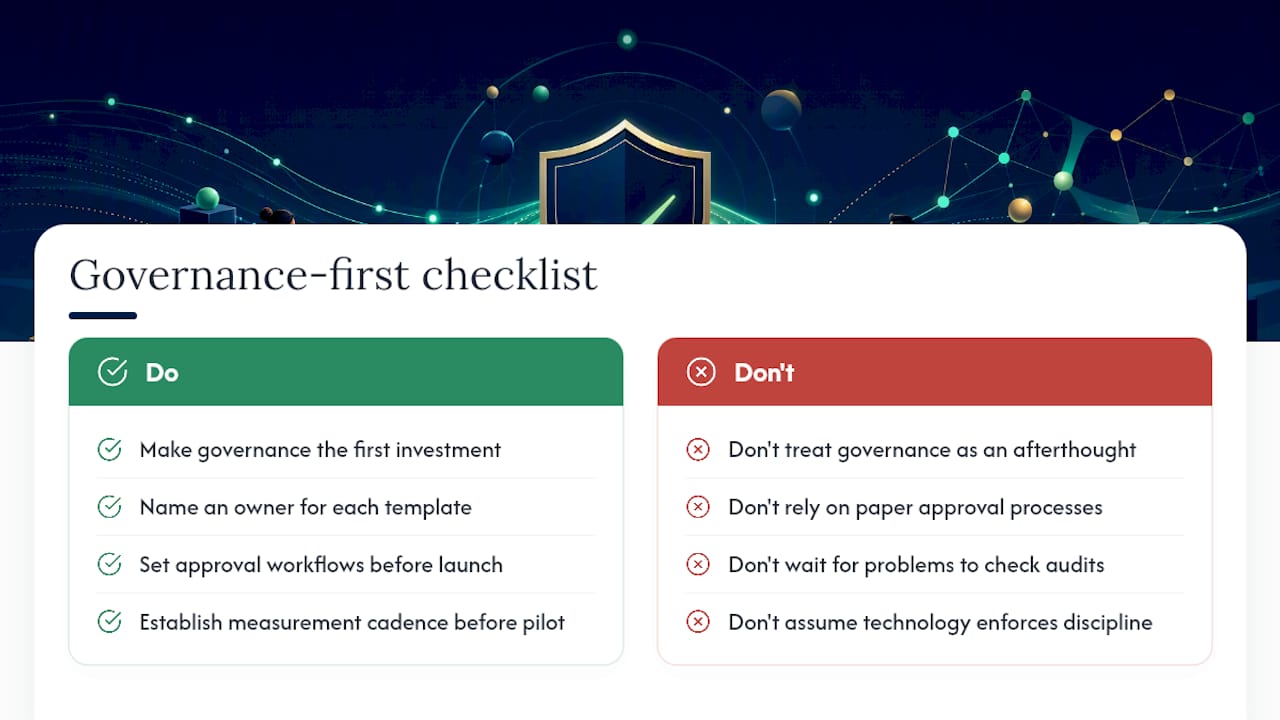
The conversation about legal document automation tends to focus on the technology and underweight the governance. That is the wrong emphasis. The technology is largely solved. Template-driven and clause-based systems have been mature for years. What separates programs that scale from programs that stall is whether the firm treats governance as a first-class design requirement rather than an afterthought.
The most common failure pattern is not a bad platform choice. It is a governance vacuum: templates with no named owner, approval workflows that exist on paper but not in the system, and audit trails that no one checks until something goes wrong. By then, the damage is done. A document generated from an outdated template, missing a required disclosure, or containing a clause that was superseded by a regulatory change does not announce itself. It surfaces in a client complaint, a regulatory inquiry, or a malpractice claim.
The practical implication is that the first investment a legal team should make is not in the platform, but in the governance model. Define template stewardship before you build templates. Establish approval workflows before you go live. Set a measurement cadence before the pilot launches. The technology will follow. What will not follow automatically is the discipline to maintain it.
After a pilot, the single most important factor in sustaining momentum is a regular governance rhythm: a monthly or quarterly review of template health, adoption metrics, and outstanding update requests. Without that cadence, the program drifts. With it, the program compounds.
Neotalogic’s approach to governed legal document automation
Neotalogic is built for legal teams that need document automation to be more than a drafting shortcut. The platform combines no-code workflow and document automation with AI-governed orchestration, giving legal teams the ability to classify and route requests, apply complex decision logic, and maintain a complete audit trail across every action.
Where most automation platforms stop at template generation, Neotalogic connects document output to the broader legal workflow: intake, triage, approval, DMS integration, and compliance reporting. The governance controls are built into the platform architecture, not configured as optional add-ons. For legal operations leaders who need to demonstrate auditability to general counsel or regulators, that distinction carries real weight.
If you are ready to move from a manual drafting process to a governed, AI-assisted workflow, the next step is a platform demonstration. You can review Neotalogic’s workflow automation capabilities or request a demo directly to see how the governance and document automation layers work together in a live legal environment.
Ready to make your AI workflows defensible?
Book a demo and we'll walk one of your real processes through Neota.
Book demo