Decision table modeling gives legal and compliance teams a way to map every condition in a rule to its correct outcome, in a grid that both humans and software can verify. The core benefit is auditability: a table exposes gaps, contradictions, and redundant logic that narrative policy language hides. What follows is the practical mechanics: how to build one, test it, and keep it defensible once it runs inside a workflow.
Neotalogic
neotalogic.com
Put Governed Decision Logic to Work
Neota Logic connects legal expertise with governed AI workflows, applying decision logic while preserving oversight, compliance, and audit trails.
Table of Contents
What Decision Tables Are and Why They Matter for Legal Work
A decision table maps a set of conditions to a set of actions. Each column is a rule. Each row is either a condition (an input the table checks) or an action (an output it produces). Read down a column, and you get one complete rule: if these facts hold, this outcome follows.
That structure does something narrative legal text cannot. Prose buries conflicting clauses and unstated exceptions inside paragraphs. A table forces every condition into the open, which is why decision tables have supported formal legal knowledge systems for decades. Analysts can scan a table and see, in seconds, whether two rules contradict each other or whether a fact pattern falls through a gap in the logic.
Legal and compliance teams reach for decision tables most often in:
Academic analysis of legal knowledge-based systems finds decision tables outperform flowcharts specifically where the underlying law behaves as a set of decision rules, tax and social-benefit statutes being the clearest examples. They are not the right tool for every legal question, but where the law reduces to “if fact pattern X, then result Y,” a table beats a memo every time.
Decision Table Components and Notation, With a Legal Example
Every decision table has four zones. Condition rows sit at the top, each testing one variable. Action rows sit below, each stating one possible outcome. Rule columns run left to right, each column a complete if-then statement. Cell values fill the grid, and how you write those values determines whether the table stays readable as it grows.
Two notation styles matter here:
Consider a benefit eligibility rule with two conditions: applicant income (under $30,000, $30,000 to $60,000, over $60,000) and household size (1 to 2, 3 or more). That is six possible combinations. A limited-entry table with six rule columns, two condition rows, and one action row (approve, partial award, deny) shows every combination on one page, with no combination left ambiguous.
Pro Tip: Start every table with the “don’t care” dash sparingly. A dash means the condition truly has no bearing on the outcome. If you find yourself dashing out a condition just to save space, that is a sign the condition belongs in a separate subtable, not erased from this one.
How to Build and Validate a Legal Decision Table
Start with the consequence, not the conditions. Ask what outcomes the rule can actually produce, whether that is “approved,” “denied,” “escalate to senior counsel,” or some fixed set of statuses. Working backward from conditions without first fixing the possible outcomes is the single most common cause of tables that need to be rebuilt.
The build sequence:
Completeness testing uses a straightforward rule count. Tax practitioner guidance on decision tables lays out the classic formula: multiply the number of possible values for each condition together, and that product is the number of rule columns a complete table needs. If your table has fewer columns than that product, you have a gap. If two columns produce different actions from the same condition values, you have a conflict. If two columns produce the same action from equivalent conditions, one is redundant and can be merged.
Once a table exceeds roughly a dozen rule columns, cognitive load takes over and errors creep in. That is the signal to decompose into subtables, a technique documented in legal decision-table research as the standard fix for tables that outgrow a single page.
Modeling Patterns and Anti-Patterns for Legal Tables
Complexity is the enemy of an auditable table, and a handful of patterns keep it under control. Established decision table patterns recommend decomposing a large table into smaller subtables whose outputs feed a final combining table, rather than forcing every condition into one grid. Input elimination, dropping a condition that turns out not to affect the outcome across any rule, shrinks tables further without losing any logic.
Hit policy choice deserves more attention than it usually gets in legal contexts. A UNIQUE policy assumes exactly one rule can match a given fact pattern, which works for clean eligibility logic but breaks silently if two rules ever overlap. FIRST policy returns the first matching rule in order, useful for exception hierarchies but dangerous if rule order isn’t documented. COLLECT returns every matching rule, appropriate when multiple obligations can apply simultaneously, such as stacking regulatory disclosures.
Watch for these anti-patterns:
Each of these looks fine on a first read and fails during an audit.
From Legal Text to Executable Models: What the Research Shows
Converting a statute or policy into an executable decision model used to be manual, slow work. Automated generation, including LLM-assisted drafting, is changing that pace, but the research is specific about what makes automated generation reliable.
Providing structured input/output specifications alongside the source legal text is the single most impactful intervention. Research evaluating structured representations for legal decision model generation found that text paired with explicit I/O specs improved structural similarity to expert-built models by 37% to 54% over text-only generation, with generated models reaching 51% to 53% outcome equivalence on average against hand-built reference models.
Define the inputs, their types, and the allowable outputs before you generate anything. That single constraint does more to keep an automated model faithful to the underlying legal text than any amount of prompt refinement after the fact.
The same research found that converting verbose DMN or XML output into a lightweight JSON or DAG representation cut textual length by a factor of about two to three, making models dramatically faster for a human reviewer to check line by line. It also found that many reference models built by legal experts contain pass-through identity nodes, making up a substantial portion of nodes in some gold models, and generated models often strip these out while preserving the same outcomes. Structural compactness is not proof of legal correctness. A model can be smaller and still wrong.
The workable division of labor: legal experts define the I/O specification and the legal consequence, generation produces a candidate model, and legal experts verify it against outcome-based test cases before it touches production. Skip the last step, and you have a plausible-looking model with no legal authority behind it.

Tooling, Formats, and Fitting Decision Tables Into Legal Operations
Most legal decision logic moves through three formats on its way to production. Analysts draft in spreadsheets because rows and columns match the mental model directly. Rules then export to DMN (Decision Model and Notation), the industry standard for executable decision logic that workflow engines can run. From there, teams increasingly convert DMN to a lightweight JSON or DAG structure for human review, since raw DMN XML is verbose and hard to scan.
A few checks matter every time a table crosses a format boundary:
Decision tables earn their place inside legal operations at the intake and triage layer, where incoming requests get classified and routed before a human ever touches them, a pattern covered in more depth in this legal intake automation playbook. They also plug into document automation workflows, where a table’s output populates the correct clause set or eligibility notice automatically. Industry guidance on compliance automation makes a similar point: automation only earns trust when the underlying logic is traceable, not just fast.
Governance and Auditability: What Production Decision Logic Requires
A decision table is only as trustworthy as the controls wrapped around it. Production legal logic needs versioning, so every change to a rule column has a timestamp and an owner. It needs explainability, so any output traces back to the exact rule that fired and the exact source text that rule implements. It needs audit trails that log every execution, not just every edit. And it needs human review gates before a new or changed table goes live for real matters.
This is the governance layer that separates a decision table sitting in a spreadsheet from one running inside an automated legal workflow. Neota Logic builds governed AI infrastructure for legal and compliance teams around exactly this layer. Not a point solution. Not a chatbot. Governance is the differentiator, rather than the feature list, a distinction explored further in what AI governance actually means for legal teams.
Before any decision model touches production, verify:
Skipping any one of these turns an audit into a guess.
Compliance Considerations When Deploying Legal Decision Tables
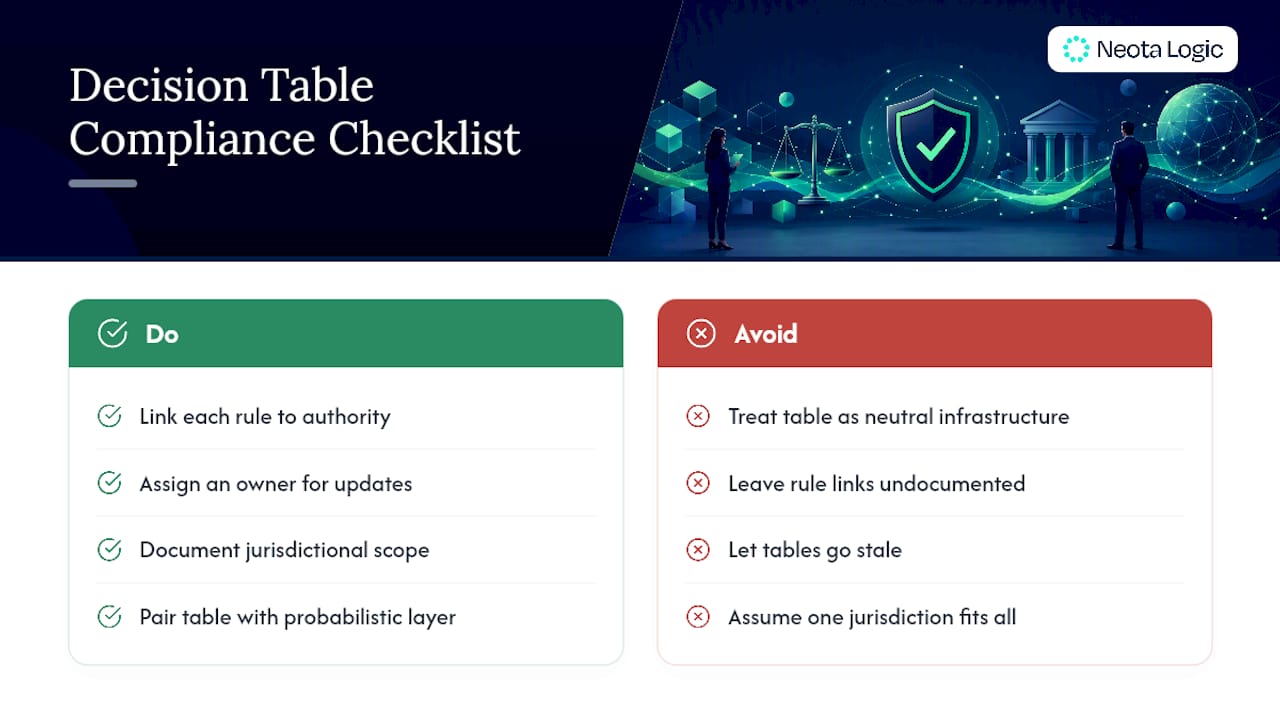
A decision table that encodes legal logic is not neutral infrastructure. It is a representation of legal judgment, and regulators, auditors, and opposing counsel will treat it that way if it ever gets examined.
The first consideration is traceability to authority. Every rule column needs a documented link back to the statute, regulation, or policy clause it implements. Without that link, the table is a black box that happens to produce plausible answers, which is exactly the exposure regulators flag in AI-assisted decision systems.
The second is version control tied to legal change. Statutes and regulations amend on their own schedule, and a decision table that goes stale silently produces confidently wrong outcomes. Every table needs an owner responsible for monitoring the source law and a documented process for updating rule columns when it changes.
The third is jurisdictional scope. A table built for one jurisdiction’s eligibility rules will produce wrong answers if applied to a fact pattern from a different jurisdiction with superficially similar law. Tables need explicit scope conditions, not implied ones.
Fourth, hybrid uncertainty. Not every legal question reduces cleanly to a deterministic rule. Where judicial discretion or evidentiary weight genuinely varies, research on combining decision tables with probabilistic models suggests pairing firm regulatory rules in a table with a probabilistic layer for the genuinely uncertain elements, rather than forcing uncertainty into a false binary.
Finally, human accountability. A decision table can automate the application of a rule. It cannot, on its own, take legal responsibility for that application. Every production table needs a named human reviewer of record.
The Real Gap Is Verification, Not Modeling
Most guidance on decision tables treats the modeling step as the hard part, and it isn’t. Building a limited-entry table with clean rule columns is a mechanical skill any legal ops analyst can learn in a week. The part conventional advice skips is verification, and that’s the part that determines whether a table survives an audit or a malpractice claim.
A table can pass every structural check and still get the legal answer wrong in a meaningful share of cases. That gap only closes with outcome-based test cases run against source text, by a human with legal authority to sign off.
My honest read: teams that treat decision table modeling as a documentation exercise, something you build once and file away, are building risk into their own compliance posture. Treat it instead as a living artifact with a version history, a named owner, and a recurring test cycle. Prioritize the I/O specification before you build anything. Prioritize the human review gate before you automate anything. The table is the easy part.
Put Governed Decision Logic to Work
Building a clean decision table is only half the job. Running it inside a workflow that keeps a full audit trail, version history, and explainability at every step is where most legal teams stall out, and it’s the exact gap Neota Logic was built to close. Unlike a generic automation tool bolted onto your existing systems, Neota Logic is governed AI infrastructure purpose built for legal and compliance teams, with decision logic, audit trails, and versioning as core infrastructure, not add-ons.
If your team is converting legal text into decision logic and needs a home for that logic that a regulator or opposing counsel could actually inspect, take a look at the Neota Logic platform to see how governed workflows handle intake, triage, and decision automation end to end. You can also review how the platform applies to legal teams specifically and request a demo to see your own decision logic modeled inside a governed environment.
Sources
FAQ
What Is a Decision Table in Legal Modeling?
A decision table maps every combination of legal conditions to its correct outcome in a grid format, making gaps, conflicts, and redundant rules visible in a way narrative policy text cannot.
How Is a Decision Table Different From a Flowchart for Legal Rules?
A decision table shows all rule combinations at once and supports formal completeness and conflict testing, while a flowchart traces one path at a time and hides overlapping or missing branches, an advantage documented in legal knowledge-based systems research.
What Is Limited-Entry Notation and When Should I Use It?
Limited-entry notation reduces every table cell to Y, N, or a dash for “don’t care,” keeping tables compact once you pass four or five conditions, versus full-entry notation that spells out condition text in every cell.
Can AI Generate Legal Decision Tables Automatically?
AI can generate candidate decision models from legal text, and providing explicit input/output specifications improves structural accuracy by 37% to 54% over text-only generation, but human legal review against outcome-based tests remains required before deployment.
How Do I Test a Legal Decision Table for Completeness?
Multiply the number of possible values for each condition to get the required rule-column count, then confirm your table has that many columns with no duplicate or conflicting outcomes, a method detailed in tax practitioner decision table guidance.
Does Neota Logic Support Decision Table Workflows?
Neota Logic provides governed AI infrastructure that runs decision logic inside audited, versioned workflows with human review gates, built specifically for corporate legal and compliance teams rather than as a general-purpose automation tool.
Recommended
Ready to make your AI workflows defensible?
Book a demo and we'll walk one of your real processes through Neota.
Book demo