The best BRYTER alternative is the one that governs AI inside your legal workflows, not the one with the longest feature list. Checkbox, Tonkean, OpenRules and Neota Logic each solve a different version of the problem. This guide compares them on what a general counsel or legal ops leader has to defend later: audit trails, versioning, explainability and control over which models touch legal work.
You already know what AI does. The open question is who is accountable when it acts. Every tool below answers that differently.
TL;DR
- Judge every BRYTER alternative on governance first: audit trails, versioning, explainability and human oversight. Features come second.
- Checkbox centers on intake, triage and a legal service hub. Tonkean and OpenRules solve adjacent orchestration and decision problems.
- Generative AI tools alone lack the orchestration and administration layer legal work needs.
- Neota Logic is governed AI infrastructure. It is model-agnostic, deterministic where the law demands it, and auditable at every step.
- Run a scoped pilot against one real workflow before you sign anything.
Table of Contents
- Who ends up on a BRYTER shortlist
- What to demand from any alternative
- The alternatives, compared
- Why feature parity misleads
- Where Neota Logic fits
- Perspective: governance is the buying decision
- A practical evaluation plan
- Start with a scoped engagement
- FAQ
- Sources
Who ends up on a BRYTER shortlist
Legal teams rarely arrive at this search by accident. Something forced it. A renewal came up. A workflow outgrew its first build. Security asked how AI outputs are logged. Outside counsel started asking how the team uses models on privileged material.
The market is crowded. One industry review of workflow automation for corporate legal departments lists BRYTER, Checkbox, Josef, Kim, MyLegal, Neota, OnitX, TAP and Tonkean among the leading solutions. That list is a starting point, not a shortlist. These products are not interchangeable.
Three categories sit inside it:
- Legal service hubs. Intake, triage, matter tracking and reporting in one place.
- General orchestration and decision engines. Powerful, but built for any industry.
- Governed legal AI infrastructure. Workflow logic, document automation and AI models under one control layer.
Know which category you are buying before you compare a single screen.
What to demand from any alternative
Buyers compare feature grids. Regulators, opposing counsel and your own board will not. They ask what happened, who approved it and whether you can prove it. Use these criteria.
Audit trails
Every action needs a record. Who submitted the request. What logic fired. Which model produced which output. Who reviewed it. When. The hgp review notes that legal workflow tools typically include audit trails and role-based access layers. Typical is the floor. Ask whether the trail covers AI outputs and human overrides, not just form submissions.
Versioning
A workflow changes. A policy changes. The question is whether you can reconstruct the exact logic that produced a decision six months ago. If the platform overwrites its own rules, you cannot. Demand version history on workflows, templates, decision logic and prompts.
Explainability
A decision you cannot explain is a decision you cannot defend. Rule-based logic explains itself. A raw model output does not. Ask the vendor to show the reasoning path for one real outcome, live.
Human oversight
Where does a lawyer sit in the flow? Approval gates must be part of the design, not an afterthought. Ask who can bypass them.
Model flexibility
Models change fast. A platform tied to one provider ties your legal operations to that provider’s pricing, terms and outages. Ask which models are supported and how you swap one out without rebuilding workflows.
Integration
Workflow tools reach adjacent systems through pre-built integrations, iPaaS connectors or third-party iPaaS. Confirm that your document management, CRM and messaging tools are covered natively. Confirm that the audit trail survives the handoff.
The alternatives, compared
The table sets each option against the criteria above. Details come from vendor pages and the review cited in this guide. Verify current capabilities in a live demo.
| Option | Core focus | Strongest fit | Governance questions to press |
|---|---|---|---|
| BRYTER | No-code workflow and automation for legal and compliance teams | Teams digitizing processes beyond document drafting | Depth of AI output logging and model choice |
| Checkbox | Legal service hub: intake, triage, matter management, reporting | In-house teams consolidating request channels | Audit coverage of AI-driven routing and chatbot answers |
| Tonkean | Business process orchestration with legal intake use | Enterprises running intake across functions | Legal-specific defensibility and privilege handling |
| OpenRules | Executable decision services | Technical teams modeling rules in spreadsheets | Legal workflow layer, document automation, user experience |
| Neota Logic | Governed AI infrastructure for legal and compliance | Teams that must defend every AI-assisted decision | Fit with your existing stack and scope of first build |
BRYTER
BRYTER is the reference point. It is a no-code platform that helps legal and compliance teams build end-to-end workflows rather than only draft documents. That breadth explains why it appears on so many shortlists. It also explains why teams look elsewhere when their priority narrows to governed AI, model independence or a specific deployment model.
Checkbox
Checkbox is a no-code legal operations platform. It captures requests from email, Slack, Microsoft Teams, Salesforce and intranets, then categorizes and routes them with AI. It also offers self-service tools and a chatbot for routine questions.
That is a strong intake story. The governance question is the chatbot. When a business user receives an answer without a lawyer in the loop, you need a record of the question, the answer and the logic behind it. Ask to see it.
Tonkean
Tonkean appears in the same industry review as a leading workflow option for legal departments. It is an orchestration product with broad business use. Orchestration-focused tools suit complex workflows, but the review also notes they can be challenging to manage. Ask who maintains the logic after go-live, and whether legal owns it or IT does.
OpenRules
OpenRules is a different animal. Its official site describes a decision-intelligence platform for executable operational decisions. Decision tables are authored in Excel or Google Sheets. The platform offers visual modeling, testing and debugging, deployment through REST, serverless, container or AI agents, and explainability with execution logging.
For a team with engineering support and a rules-heavy problem, that is real capability. For a legal department that needs intake forms, document assembly and business-user self-service, you assemble the rest yourself.
Others on the list
Josef, Kim, MyLegal, OnitX and TAP also appear in the review. Treat each the same way. Identify its category, then press it on audit, versioning, explainability and model control.
Why feature parity misleads
Most platforms in this space now claim intake, automation, AI assistance and reporting. On a slide, they look identical. In an audit, they are not.
Two failure modes matter.
Ungoverned AI inside a workflow. A model drafts, classifies or advises. Nobody logs the prompt, the model version or the reviewer. Months later, a regulator or opposing counsel asks how a decision was reached. You have no answer. Privilege questions follow. The argument writes itself.
Pure generative tools. The industry review makes the point directly. Generative AI tools typically lack the workflow orchestration and administration features needed to manage processes and gather performance data. A chat window is not a system of record.
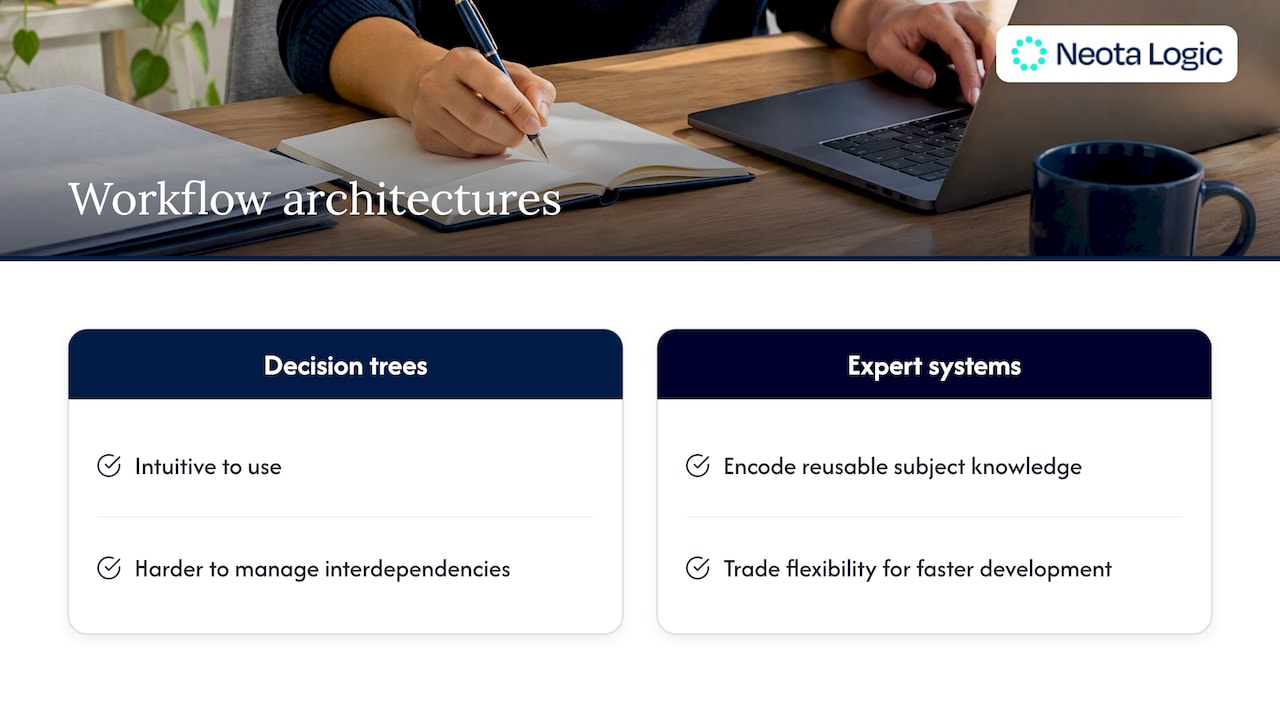
The design choice also matters. Decision-tree solutions are intuitive, but the same review finds interdependencies are harder to manage. Expert systems encode subject-matter knowledge into reusable logic, and trade some flexibility for faster development. Know which architecture you are buying. Legal logic with dependencies, exceptions and jurisdictional variation needs more than a tree.
Where Neota Logic fits
Neota Logic is governed AI infrastructure for legal and compliance teams. It is not a point solution. It is not a chatbot.
The platform orchestrates AI models inside deterministic workflows. Legal experts define the logic. Models assist within it. Humans approve where the design requires. Every step is tracked.
What that means in practice:
- Intake and triage. Classify and route legal requests, then apply decision logic to each.
- No-code workflow and document automation. Legal teams build and change workflows without waiting on engineering.
- Multiple AI models. The platform is model-agnostic. You avoid vendor lock-in and keep the freedom to change models as the market moves.
- Auditing and compliance controls. Actions are recorded for review. Reporting turns that record into data you can use.
- Integrations. Neota connects to your existing document, CRM and communication tools.
The solution areas include Workflows, Document Automation, Advisory Solutions, AI Enabled Solutions, Contract Automation, Risk Assessment, Compliance Advisor, Onboarding Processes, Supplier Management and AI Governance. You can review the full set on the Neota Logic solutions page.
Governance is the differentiator here, not the feature count. A competitor may match a feature. The question is whether it can show you the full record behind a decision.
Perspective: governance is the buying decision
We see the same pattern in every evaluation. Teams start with a feature checklist. They end with a governance question.
We built Neota Logic around that second question. Our position is simple. AI in legal work must run inside a controlled structure, or it creates liability faster than it creates efficiency. An ungoverned model output in a privileged workflow is a risk you chose to take. Privilege dies quietly.
Three convictions shape our product.
- Deterministic first. Where the law gives a rule, the workflow applies the rule. Models assist. They do not decide alone.
- Every action is evidence. Audit trails, versioning and explainability are not add-ons. They are the product.
- No model owns you. Models improve and change. Your workflows should not break when they do.
If you are replacing BRYTER, do not replace it with a longer feature list. Replace it with a structure you can defend to your board, your regulator and your outside counsel.
— Patrick
A practical evaluation plan
No comparison page substitutes for testing your own workflow. Use this sequence.
- Pick one real workflow. Choose a high-volume process such as NDA intake, vendor onboarding or a compliance questionnaire.
- Write the governance test first. List what you must prove: who acted, which logic ran, which model responded, who approved.
- Demand a live demo on your data. Slides prove nothing. Watch each vendor reproduce a past decision from its own records.
- Test a model swap. Ask the vendor to change the underlying model. Measure what breaks.
- Check the integration path. Confirm your document management, CRM and messaging tools connect natively and that logging survives the handoff.
- Ask who maintains it. If every change needs IT or a consultant, your legal team does not control its own workflows.
- Involve security and compliance early. They will ask about access controls and data handling. Better they ask now.
Score each vendor on the same sheet. Weight governance at least as heavily as usability.
Start with a scoped engagement
If your shortlist includes Neota Logic, begin small. Our Discovery Sprint is built to scope one workflow, map the governance requirements and show what a governed build looks like in your environment. Platform access and deployment services follow once the scope is clear.
See the engagement options on the Neota Logic pricing and services page, or start from the Neota Logic home page. Bring your hardest workflow. That is the one worth testing.
FAQ
What is the best BRYTER alternative for a corporate legal team?
It depends on the problem. For intake and a service hub, Checkbox is a common option. For governed AI with full audit trails and model independence, Neota Logic is built for that purpose. Pick the category first, then the vendor.
Is a general workflow tool enough for legal work?
Often it is not. Legal workflows carry privilege, jurisdictional variation and defensibility requirements. General orchestration tools handle complexity, but the industry review notes they can be hard to manage. Legal teams need to own the logic without depending on IT.
Can I use a generative AI tool instead of a workflow platform?
You can use it for drafting. You cannot run a process on it. Generative tools typically lack orchestration, administration and performance data. A governed platform wraps models in logic, approvals and records.
What should I ask a vendor about AI governance?
Ask five things. Does the audit trail log AI outputs and human overrides? Are workflows and prompts versioned? Can the vendor show the reasoning path for one real decision? Where do humans approve? Can you swap models without rebuilding?
How long should a vendor evaluation take?
Run a scoped pilot on one workflow, not a long bake-off. A focused test exposes governance gaps faster than any feature grid. Set the criteria before the first demo.
Sources
Ready to make your AI workflows defensible?
Book a demo and we'll walk one of your real processes through Neota.
Book demo