To manage legal projects well, define scope before work starts, assign one owner per deliverable, track status against a plan, and put every decision on a path you can audit. The first three are classic legal project management. The fourth is where most legal teams fail now. AI tools touch intake, drafting and review, and the project record does not show who decided what. Neota Logic is governed AI infrastructure for legal and compliance teams. It puts a logged, versioned workflow around the work, so the project plan and the evidence trail are the same thing.
TL;DR
- Legal project management applies initiation, planning, execution, monitoring and control to legal work. It is a discipline, not a software category.
- Scope, owners, timeline and budget get fixed in a charter before work begins. Late scope is the main source of drift.
- Tracking needs a plan, status reports and variance reviews. It also needs a record of every automated and human decision.
- AI does not move accountability. Lawyers answer for the output, so each project needs checkpoints and logs.
- Governance is the differentiator. Audit trails, versioning and explainability decide whether a project holds up under review.
Table of Contents
- What legal project management is
- Why it matters now
- Step 1: Define scope before anyone starts
- Step 2: Assign owners and stakeholders
- Step 3: Build the plan and the budget
- Step 4: Track work, deadlines and status
- Step 5: Improve collaboration across the team
- Step 6: Bring AI into the project without losing control
- Step 7: Measure whether it works
- Where Neota Logic fits
- Our perspective
- FAQ
- Sources
What legal project management is
Legal project management takes the standard project cycle and applies it to legal work. The Association of Corporate Counsel describes the cycle as initiation, planning, execution, monitoring and control. The goal is to manage matters efficiently and cost-effectively and to deliver predictable, consistent service.
You already know the theory. The practical question is what breaks it in a live department.
Three things break it:
- Work arrives through unmanaged channels. Email, chat and hallway requests never become projects. They stay invisible until they are late.
- Decisions live in people’s heads. Who approved the exception? Which playbook version applied? Nobody can reconstruct it.
- Reporting is manual. Status is assembled by hand before each meeting. It is stale by the time it is read.
A legal department that fixes these three has a project management function. One that fixes none has a to-do list.
Why it matters now
The case for legal project management was once about cost control. Altman Weil frames the benefit as more and better work, legal services aligned with business needs, and tighter management of outside counsel’s cost and quality. That case still stands.
A second case has arrived. Your teams run AI tools on live matters. Each one creates a decision that someone must be able to explain. A project with no record of its AI-assisted steps is a liability, not an efficiency.
The LPM Institute’s white paper notes that legal organizations moved from questioning LPM principles to applying them in many parts of their work. The next move is applying them to AI-assisted work.
Step 1: Define scope before anyone starts
Scope is the starting point. The ACC guidance says defining it determines phases, timeline, staffing and budget. Skip it and every later number is a guess.
Write a charter. The ACC lists what a project charter can contain:
- Project description and goals
- Scope
- Key assumptions and risks
- Team members and leadership
- Timeline and key deliverable dates
Add three lines the standard charter lacks.
- Decision rights. Name which decisions are rule-based and which need judgment. A rule-based decision, such as whether a contract needs escalation under policy, should not depend on who happens to read the request.
- Automation boundary. State which steps use AI and which do not. Drafting, classification and summarizing suit AI. Eligibility, approval thresholds and regulatory determinations do not.
- Checkpoint map. Mark where a human signs off. Put the checkpoint where the risk sits, not where it is convenient.
This is where governance starts. It is cheaper to decide in the charter than to explain after an incident.
Where it goes wrong
Charters fail when they are documents nobody opens again. A charter in a shared drive does not control anything. A charter encoded as a workflow does. The scope, routing rules and approvals run the project instead of describing it.
Step 2: Assign owners and stakeholders
Every deliverable needs one owner. Shared ownership is no ownership.
List stakeholders by what they decide, not by title:
- Who approves the outcome?
- Who must be consulted before approval?
- Who is informed after?
- Who owns the underlying policy or playbook?
The last question matters most in a department that automates. If a rule changes, someone must own the change, record it and version it. Without a named owner, rules drift and nobody notices until a result looks wrong.
Step 3: Build the plan and the budget
A plan breaks the scope into phases, assigns dates and ties work to a budget. The ACC points to a project plan, periodic budget-to-variance reports, status reports and regular team meetings as the tools for tracking progress.
Keep the plan small. Four to six phases is enough for most legal projects. More than that and nobody maintains it.
For a matter handled by outside counsel, tie the budget to phases. Variance by phase tells you where the matter moved. Variance on the total tells you only that it did.
Step 4: Track work, deadlines and status
Tracking is the part everyone buys software for. Software is not the problem. Data entry is.
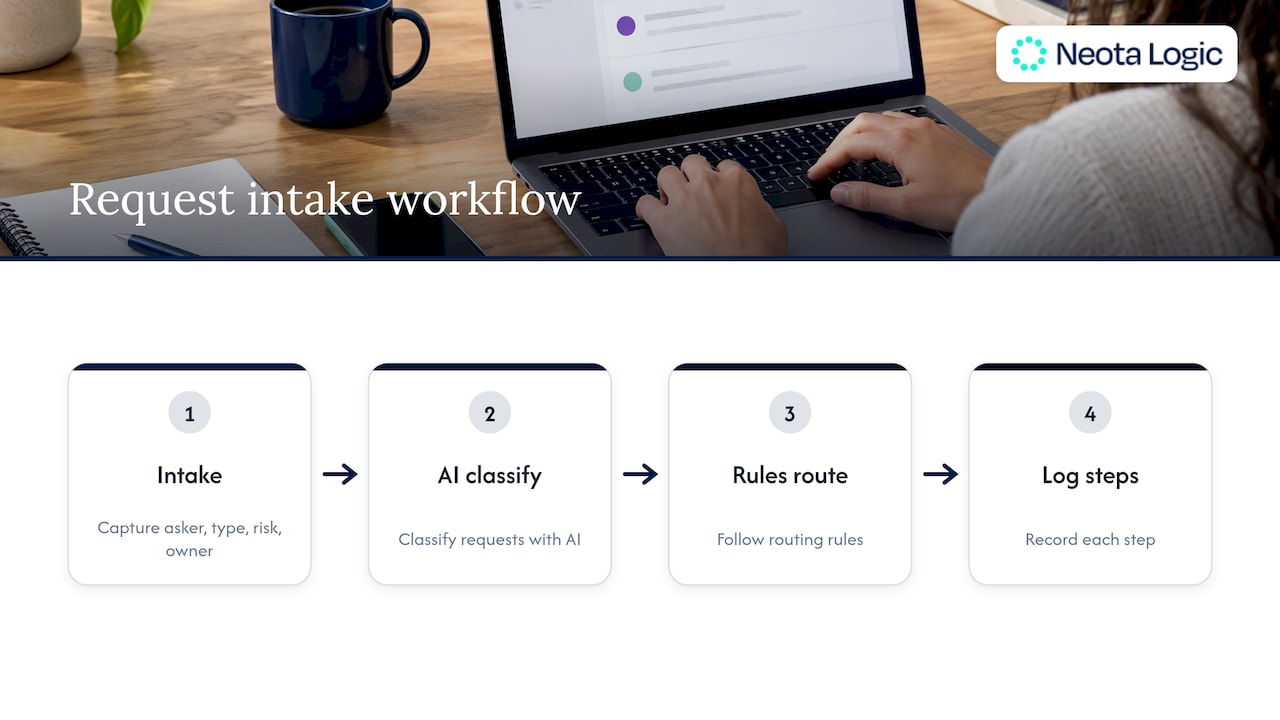
Tracking breaks when status depends on people remembering to update it. It holds when status is a byproduct of the work. If intake, routing, review and approval run through one workflow, the status already exists. Nobody reports it. The system logs it.
Track these five things on every project:
| What to track | Why it matters | Where it breaks |
|---|---|---|
| Task status | Shows what is blocked | Updated by hand, so it lags |
| Deadlines | Prevents missed dates | Held in individual calendars |
| Workload | Shows who is overloaded | Invisible when work arrives by email |
| Cost against budget | Flags variance early | Reconciled monthly, not live |
| Decisions and approvals | Proves what happened | Not recorded at all |
The fifth row is the one most legal teams lack. It is the one an auditor, a regulator or opposing counsel asks about.
Intake is where tracking starts
A project you never saw cannot be tracked. Requests that arrive by email need to become structured matters at the door: who asked, what type, what risk, who owns it. Our Legal Intake Automation and Email Intake and Routing capabilities exist for this. Classification can use AI. The routing decision follows rules you set, and each step is logged.
Step 5: Improve collaboration across the team
Collaboration problems in legal are mostly handoff problems. Work moves between lawyers, paralegals, business clients and outside counsel. Every handoff loses context.
Fix handoffs, not meetings.
- Standard intake. Business clients submit requests through one structured path. They stop guessing which lawyer to email.
- One record per matter. Documents, decisions and status sit together. Nobody asks for the latest version.
- Defined escalation. If a request meets a threshold, it goes to a named person automatically. Judgment is saved for judgment calls.
- Visible status for clients. Business partners see where their request stands. Status-chasing emails drop.
Multidisciplinary projects add compliance, finance, HR or IT. The rule is the same. Define who decides what, and put the decision path in the workflow. A shared channel is not a process.
Step 6: Bring AI into the project without losing control
Your lawyers already use AI. The project question is not whether. It is whether the use is governed.
The ABA settled the baseline. Formal Opinion 512, issued July 29, 2024, holds that generative AI does not absolve lawyers of their duties under the ethics rules. Lawyers must understand the tools’ capabilities and limits, safeguard client information, review output before submitting it and follow clear firm policies.
Accountability does not transfer. The ABA’s privilege analysis puts it bluntly: trusting the AI and forgetting to verify is not an acceptable justification for errors.
Translate that into project design:
- Separate the decision path from the drafting path. Eligibility, thresholds and policy determinations run on deterministic rules. The same input gives the same output every time. AI drafts, classifies and summarizes inside that frame.
- Place human checkpoints by risk. High-exposure outputs get a lawyer’s sign-off before they leave. Low-risk work moves faster.
- Log every step. Input, rule applied, AI output, reviewer and timestamp. If you cannot reconstruct a decision, you cannot defend it.
- Version everything. Rules, prompts, templates and playbooks all change. Each change needs a date, an owner and a prior state you can restore.
- Make it explainable. A reviewer should see why a request was routed, flagged or approved. A rule is explainable. A probability is not.
A project plan without these five is a plan for ungoverned AI use. The first incident will show it.
Orchestration beats replacement
You do not need to retire the tools your lawyers use. Governance sits above them. That is the control layer model: one workflow engine that calls the AI tools you run, applies your rules, records the result and stops at the checkpoints you define. The tools stay. The control moves to you.
Step 7: Measure whether it works
Define success at the start. The LPM Institute advises setting metrics at the outset to determine when success is reached, and notes the metrics may change as implementation evolves. Review them on a schedule. Do not wait for a crisis.
Use measures a GC can defend to a CFO and a board:
- Cycle time from request to resolution, by matter type
- Budget variance by phase
- Intake coverage: share of requests entering through the structured path
- Rework rate: share of outputs sent back at a checkpoint
- Audit readiness: time needed to reconstruct a decision from the record
The last measure is the governance test. If reconstruction takes days, the record is weak. If it takes minutes, the project is controlled.
Where Neota Logic fits
We built Neota Logic for this problem. It is governed AI infrastructure for legal and compliance teams. It is not a point solution and it is not a chatbot. A deterministic rules engine handles the decisions that cannot be wrong. AI handles drafting, classification and summarizing. A human checkpoint sits wherever you want one. Every step is logged.
Our legal engineers scope and build each solution. You get a working application in weeks without pulling your own team off client work.
The relevant starting points for project work:
- Legal intake and AI Enabled Solutions to turn requests into tracked, routed matters
- Advisory Solutions, Risk Assessment and AI Governance to encode policy as rules your team controls
- Document Automation and Contract Automation to generate, review and redline with a record of each action
To see how this maps to your department’s projects, review the platform and deployment options and request a demo.
Our perspective
Legal project management has a blind spot. It tracks tasks, dates and budgets. It does not track decisions.
That was tolerable when every decision was made by a lawyer who remembered making it. It is not tolerable when AI drafts, classifies and summarizes inside the same project. Someone will ask who decided, on what basis, under which version of the rule. The answer cannot be a memory.
We take a position. Governance is the differentiator, not features. A feature list does not survive a privilege challenge or a regulator’s questions. An audit trail does. Versioning does. Explainability does.
So we split the work. Rules decide what cannot be wrong. Our rules engine is deterministic, which means it does not hallucinate on the decision path. AI does the work that benefits from it. Humans sign off where the risk is. Every action is logged.
We sit on top of the AI tools you already run. We do not ask you to abandon them. We ask you to govern them. Our legal engineers build the application with you, so your team stays on client work.
Twenty years of law firm deployments taught us one thing. The projects that last are the ones where control was designed in at the start.
Patrick
FAQ
What is the first step to manage a legal project?
Define scope in a written charter. The ACC says scope drives phases, timeline, staffing and budget. Add owners, decision rights and checkpoints at the same time. Everything after that depends on this document.
How do you track legal projects across a team?
Use a project plan, status reports and periodic budget-to-variance reviews. Then remove manual updates. When intake, routing and approval run in one workflow, status is logged as the work happens. You also gain a record of every decision.
How do you improve legal team collaboration?
Fix the handoffs. Use one structured intake path, one record per matter, automatic escalation by threshold and visible status for business clients. These changes cut context loss more than extra meetings do.
How should AI fit into a legal project plan?
Assign it the work that suits it: drafting, classification and summarizing. Keep policy and eligibility decisions on deterministic rules. Place lawyer checkpoints by risk and log every step. ABA Formal Opinion 512 makes clear that accountability stays with the lawyer.
How do you know the process is working?
Set metrics before launch and review them on a schedule. Watch cycle time, budget variance, intake coverage, rework rate and audit readiness. If you can reconstruct any decision from the record in minutes, the process is controlled.
Sources
- Legal Project Management, Association of Corporate Counsel
- Legal Project Management: A Value Triple Play for Law Departments, Altman Weil
- LPM White Paper, LPM Institute
- ABA Ethics Opinion on Generative AI Offers Useful Framework, American Bar Association
- AI and Attorney-Client Privilege, American Bar Association
Ready to make your AI workflows defensible?
Book a demo and we'll walk one of your real processes through Neota.
Book demo