Productivity in a law firm or legal department comes from three moves. Find where time actually goes. Standardize the work that repeats. Automate it under controls you can prove. The third move is where most programs fail. Speed without governance creates malpractice exposure, privilege risk and a regulatory posture you cannot defend. Neota Logic is governed AI infrastructure for legal and compliance teams: a control layer over the AI tools you already run, with every step logged.
This article is for GCs, legal ops leaders and innovation heads. It skips the basics and gives you a sequence.
TL;DR
- Catalog the work before you buy anything. Sort each task into automate, delegate, reduce or eliminate.
- Standardize intake, triage and document work first. These are the highest-volume, lowest-judgment processes.
- Separate decisions that cannot be wrong from work that benefits from AI. Use deterministic rules for the first and AI for the second.
- Require audit trails, versioning and human checkpoints on every AI-assisted workflow.
- Measure against a baseline you set before the change, then review on a fixed cycle.
Table of Contents
- Start with the work, not the tool
- Standardize before you automate
- Where AI belongs in the workflow
- Governance is what makes productivity durable
- Set objectives and owners for AI
- Choose technology that fits what you run
- Measure the change
- Sustain the gains
- Where Neota Logic fits
- Our perspective
- FAQ
- Sources
Start with the work, not the tool
Most productivity programs begin with a software demo. They should begin with an inventory.
The ACBA Knowledge Center’s task-evaluation guidance tells firms to catalog daily activities to find time hiding in plain sight. Each task then gets one of four labels: automate, delegate, reduce or eliminate. The exercise is plain. It is also the one most teams skip.
The ACC’s process-improvement guide adds structure. It says to map each process as a value stream and label every step as value-add, business value-add or non-value-add. It points to bottlenecks, unnecessary steps, multiple approvals and inadequate resources as the issues to examine.
Apply that to a typical legal request path:
- A request arrives by email, chat or a hallway conversation.
- Someone reads it and decides what it is.
- Someone decides who owns it and how urgent it is.
- A lawyer asks follow-up questions the requester could have answered up front.
- A document is drafted from a prior matter or a template.
- Approvals pass through two or three people.
Steps 2, 3 and 4 add little legal value. Step 5 often repeats work already done. Step 6 frequently contains approvals nobody can explain. That is where the hours sit.
For in-house teams, the ACC Legal Ops Startup Toolkit recommends a staffing-optimization activity survey. Plot work streams and sub-processes by practice group. Interview the people who do the work. Validate the activity list. Quantify the savings. Measure outcomes with strong controls, analytics and reporting.
Do the survey in weeks, not quarters. You need a ranked list, not a perfect one.
Standardize before you automate
Automating a messy process produces a faster mess. Standardize first.
The operating model behind CLOC’s Core 12 framework is useful here. Two of its competencies matter most. The first is to match the right work to the right resource, allocating work internally and externally to whoever delivers it most efficiently. The second is to innovate and automate with technology, using systems and tools to generate efficiencies.
In practice, standardization means four things:
- One front door. Every request enters through a single structured intake, whatever channel it came from. Required fields are defined. Missing information is caught before a lawyer sees it.
- Defined triage logic. Rules decide the category, owner and priority. They do not depend on who happened to read the email.
- Template-driven documents. Standard agreements and letters are generated from approved language, with variations controlled by rules.
- Named approvers. Each approval has a reason, an owner and a threshold. Approvals without all three get removed.
These changes are not glamorous. They remove the interruptions that fragment a lawyer’s day. They also create the structured data every later improvement depends on.
Neota Logic’s offering maps directly to this layer: legal intake automation, email intake and routing, document automation, contract automation, and contract review and redlining.
Where AI belongs in the workflow
You already run AI tools. The question is not whether to use them. The question is where they are allowed to decide.
Draw the line this way.
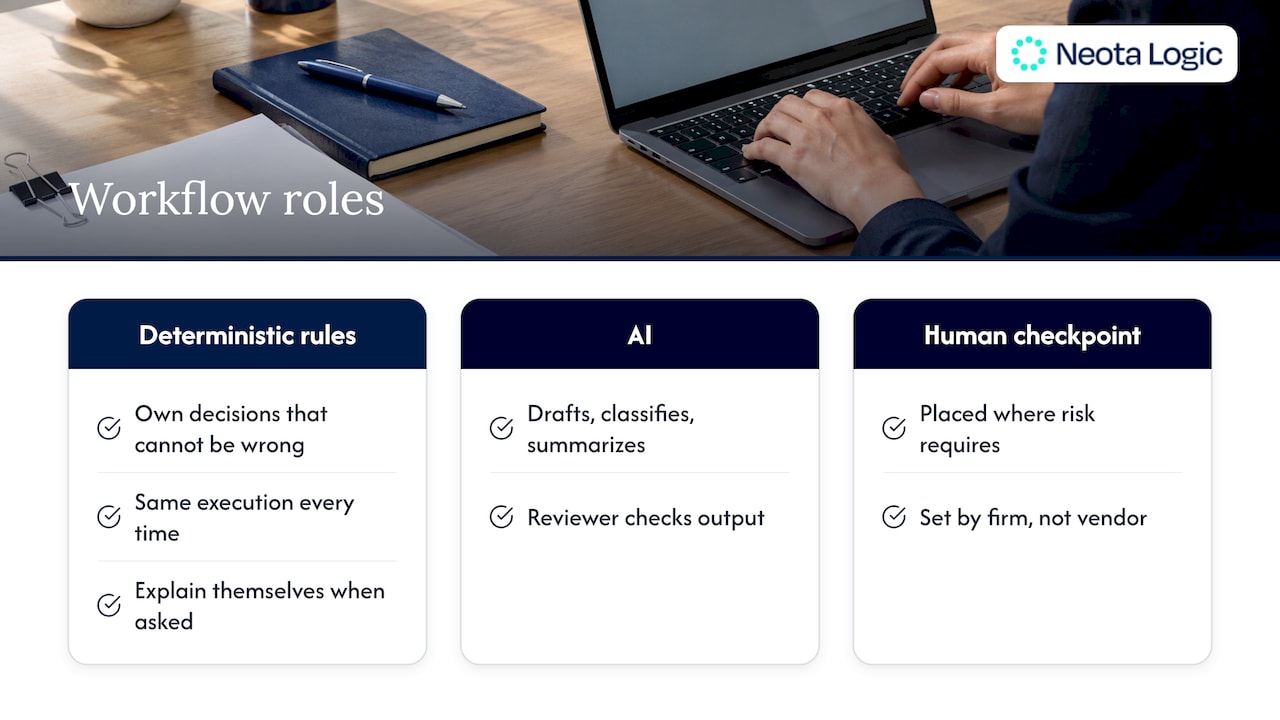
Deterministic logic owns the decisions that cannot be wrong. Who must approve this contract. Whether this matter triggers a conflicts review. Which clause fallback applies at this deal size. Which jurisdictional rule governs this notice. These are rules. They should execute the same way every time and explain themselves when asked.
AI owns the work that benefits from it. Drafting a first pass. Classifying an inbound request. Summarizing a long document. Extracting terms from a stack of agreements. A reviewer checks the output.
A human checkpoint sits wherever you decide one belongs. Not where a vendor decided. Where your risk appetite, your clients and your professional obligations require it.
This division is the whole design. It captures the speed of AI on the work where speed is safe. It keeps the decision path free of probabilistic output.
The risk of ignoring it is documented. The ABA Task Force on Law and Artificial Intelligence reports that the ABA adopted Resolution 604, urging human oversight and control, accountability and transparency for AI systems. The same report ties confidently stated but erroneous outputs to sanctions against attorneys who filed fictitious AI-generated citations. It concludes that lawyers’ professional obligations require systematic monitoring and oversight.
The Task Force also flags a data problem. Pointing AI at an entire document management system exposes the firm to outdated, low-quality and obsolete documents. Filtering them takes business rules or technical controls, and the human oversight required is a major barrier. A rules layer that scopes what AI may touch addresses this directly.
Governance is what makes productivity durable
An efficiency gain that cannot be audited is a liability waiting for a trigger. A court inquiry, a client audit, a regulator question or a privilege dispute turns an undocumented AI workflow into a problem. The argument against you writes itself.
Three capabilities separate governed automation from ungoverned use.
Audit trails
Every action needs a record: who or what acted, on which input, under which rule, with what result, and when. The RAILS AI Policy Guidance Framework from February 2025 calls for reporting systems that produce a complete audit trail for incidents. That includes when a log was generated, who accessed or modified it, and the response actions taken. Neota Logic logs every step.
Versioning
Rules change. Templates change. Models change. You need to know which version of each produced a given output on a given date. Without versioning, you cannot reconstruct a decision. You also cannot show that a fix actually fixed anything.
Explainability
A GC asked why a contract was routed to senior review needs an answer in one sentence. “The model scored it high” is not an answer. “Rule 14 fired because the counterparty is in a restricted category and the value exceeds the threshold” is. A deterministic rules engine gives you that answer. Neota Logic’s rules engine structurally cannot hallucinate on the decision path.
The RAILS framework also requires measurable key risk indicators with regular monitoring and risk dashboards. It calls for human quality-control mechanisms built into AI use-case workflows, with clear accountability and escalation paths. Neota Logic builds human-in-the-loop checkpoints in, not bolted on.
Set objectives and owners for AI
The ACC’s Artificial Intelligence Toolkit for In-house Lawyers, second edition, gives a short governance sequence. Define AI objectives such as reducing contract cycle times, improving knowledge access or cutting time on repetitive tasks. Assign responsibility for AI. Establish testing procedures and success metrics. Train legal staff.
Take a position on each point.
- Objectives: Tie every AI use case to one measurable outcome. If you cannot name it, do not deploy.
- Responsibility: Name one accountable owner per workflow. A committee is not an owner.
- Testing: Test against real matter types, not demo data. Re-test when a model or rule changes.
- Training: Train people on the workflow they will use, including when to override it.
Choose technology that fits what you run
CLOC’s “What Is Legal Operations?” paper warns that many organizations have at least one system that is underused, obsolete and disconnected from existing workflows, because it was designed for the current state and not the future one. It advises a technology roadmap that will still be in use in five years, implemented in phases.
Use that as a selection filter.
- Does it sit on top of your existing tools? Replacing Harvey, ChatGPT, Claude or your document management system adds migration risk. A control layer adds governance without that risk.
- Does it separate rules from models? If one model decides and explains, you have no control surface.
- Does it log every step? Ask what is recorded, for how long, and who can export it.
- Who builds it? A platform your lawyers must configure on their own pulls them off client work. Neota’s legal engineers scope and build each solution, so firms get a working application in weeks without diverting their own team.
- Does it integrate with document, CRM and communication tools you already use? Productivity that requires a new place to work is not productivity.
The same paper recommends build-versus-buy analysis inside that roadmap. Weigh the maintenance burden honestly. A governed internal build needs rules, versioning, logging and reporting. That is a product, not a project.
Measure the change
A productivity program without a baseline is an opinion. Set the baseline before the first workflow goes live.
CLOC’s paper says in-house departments often make minimal use of data and metrics. It directs legal ops to manage through data rather than intuition: decide which data to collect, design metrics and dashboards, and turn data into insight and then strategy.
Track a short list.
| Measure | What it tells you | Where it comes from |
|---|---|---|
| Request cycle time | How long work waits and moves | Intake and matter timestamps |
| Touches per request | How many handoffs a matter needs | Workflow log |
| Share of requests resolved by rules or templates | How much work no longer needs a lawyer’s time | Workflow log |
| Rework rate | Whether automated output survives review | Reviewer actions |
| Override rate | Where rules or AI misfit real practice | Checkpoint log |
| Realization and write-downs (law firms) | Whether captured time becomes billed revenue | Billing system |
| Client or business-unit satisfaction | Whether service actually improved | Short, regular surveys |
Two cautions. First, do not report hours saved as the only result. Report cycle time and rework too, because saved hours that become rework are not savings. Second, read the override rate carefully. A high rate means the rule is wrong or the checkpoint is misplaced. A rate near zero on a human checkpoint may mean reviewers have stopped looking.
With a governed platform, most of these numbers come from the workflow log itself. You do not assemble them by hand.
Sustain the gains
The ACC’s leading-practices report on legal operations names the change-management practices that hold up. It says to align goals with metrics and process maps, use data to match work to the right cost of service, and allow several months to customize complex systems.
That last point deserves attention. Complex workflows take time to get right. Plan for a phased rollout: one high-volume process first, then the next.
The same report quotes SolarCity’s Krakaur on trust. Building it with the stakeholders affected by change takes communication, work and repetition. Treat adoption as part of the design. Show business clients the intake form before it launches. Show partners the checkpoint before you enforce it.
A review cadence keeps the system honest. Each quarter, review the override log, the rule changes and the rework rate. Retire rules nobody uses. Add rules where lawyers keep making the same call by hand.
Where Neota Logic fits
Neota Logic is the control layer for legal AI. It puts governed, auditable workflows on top of the AI tools your team already runs. A deterministic rules engine handles the decisions that cannot be wrong. AI handles drafting, classification and summarizing. A human checkpoint sits wherever you want one. Every step is logged.
The platform covers the work this article ranks first: legal intake automation and AI-enabled solutions, document and contract automation, and advisory, risk assessment and compliance solutions, including AI governance. Neota’s legal engineers scope and build each solution. The company has twenty years of law firm deployments behind that build process.
If you have a ranked task list and a governance question you cannot yet answer, start with Neota Platform Access and Deployment & Services.
Our perspective
Most legal productivity advice stops at tools. We think that is the wrong place to stop.
Lawyers already have AI. The gap is control. A firm that cannot show which rule decided an outcome, which version of a template produced a document, and who checked the output has not improved productivity. It has moved risk off the timesheet and onto the malpractice policy.
Our position is simple. Governance is the differentiator, not features. Put deterministic logic on the decisions that cannot be wrong. Let AI work where it helps. Place human checkpoints where your obligations demand them. Log everything.
That is why we build governed AI infrastructure and not a chatbot or a point solution. It sits on the tools you run. Our own legal engineers do the build, so your team stays on client work. Productivity that survives an audit is the only kind worth the investment.
Patrick
FAQ
What is the fastest way to improve law firm productivity?
Standardize intake and triage. Every request goes through one structured front door, and rules assign category, owner and priority. This removes the reading, sorting and follow-up questions that fragment a lawyer’s day. It also produces the data you need to measure everything after it.
How do I improve legal team efficiency without increasing AI risk?
Split the work. Use deterministic rules for decisions that cannot be wrong and AI for drafting, classification and summarizing. Add human checkpoints where your obligations require them. Require an audit trail, version history and an explanation for every automated step.
How do I find which tasks to automate first?
Catalog daily activities, then label each one automate, delegate, reduce or eliminate. Rank by volume and by how little legal judgment the task needs. Intake, routing, standard document generation and first-pass contract review usually lead the list.
How do I know whether productivity actually improved?
Set a baseline before launch. Track request cycle time, touches per request, rework rate and override rate. Law firms should add realization and write-downs. Review the numbers on a fixed cycle and adjust rules where overrides cluster.
Sources
- Task Evaluation for Law Firms, ACBA Knowledge Center
- ACC Value Challenge, Process Improvement
- ACC Legal Ops Startup Toolkit Checklists
- CLOC Core 12
- ABA Task Force on Law and Artificial Intelligence
- RAILS AI Policy Guidance Framework, February 2025
- ACC Artificial Intelligence Toolkit for In-house Lawyers, 2nd Edition
- CLOC, What Is Legal Operations?
- ACC, Legal Operations: Leading Practices in Implementing
Ready to make your AI workflows defensible?
Book a demo and we'll walk one of your real processes through Neota.
Book demo