Email is where legal work enters your department, and it is where ungoverned AI does the most quiet damage. The answer is not a smarter inbox assistant. It is a control layer: a deterministic rules engine that makes the routing and eligibility decisions, AI that drafts and classifies, a human checkpoint wherever you want one, and a log of every step. Neota Logic is built as that layer, on top of the AI tools you already run.
Neota Logic
neotalogic.com
Govern Legal Email Workflows
Neota Logic combines deterministic rules, AI drafting and classification, human checkpoints, and logged steps in workflows built for legal teams.
TL;DR
Table of Contents
What email workflow automation means for legal
It means every inbound message becomes a governed event. The email arrives, the system identifies what it is, extracts the facts, applies your rules, routes it to the right person or queue, and records what happened and why.
This is not an AI inbox assistant that summarizes threads. It is workflow infrastructure. The difference matters to a general counsel because an assistant gives you output. Infrastructure gives you a defensible record.
Typical legal email tasks that fit this model:
We cover these through legal intake and AI enabled solutions, where email intake and routing feed the same governed workflow as every other channel.
Where AI helps and where rules must decide
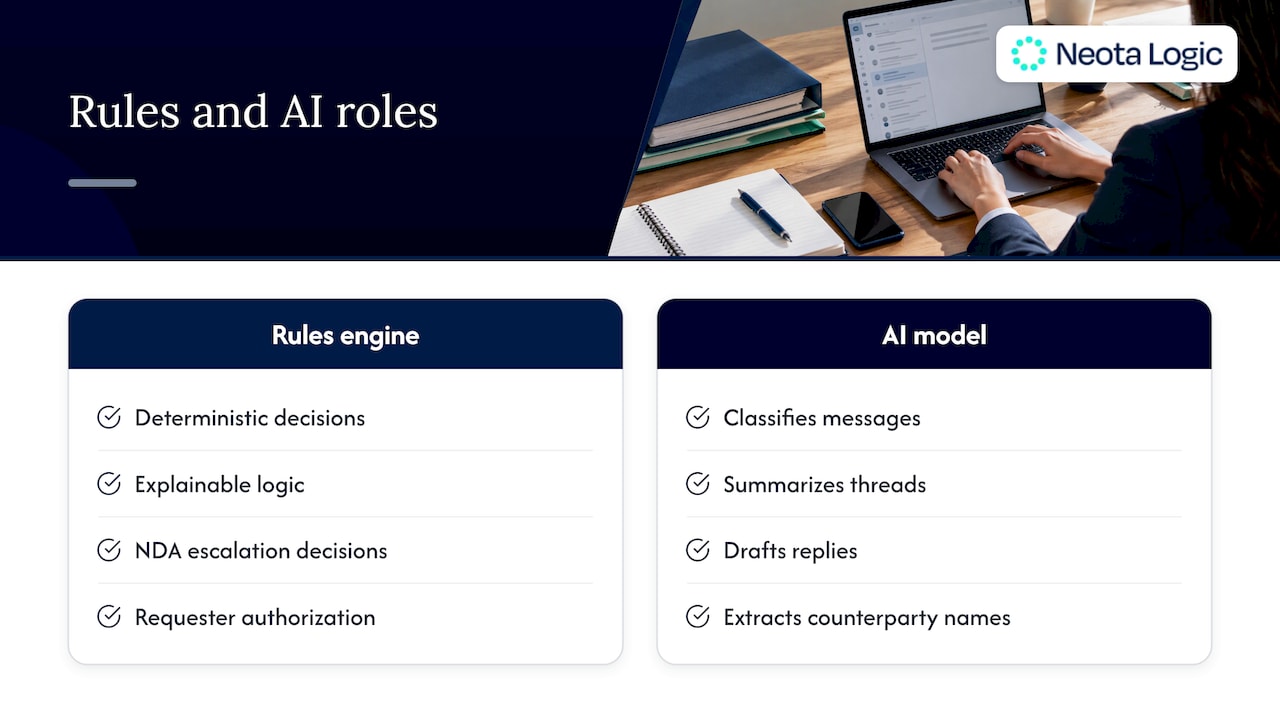
Split every email workflow into two kinds of steps.
Decision steps. Does this NDA need escalation? Is this requester authorized? Which jurisdiction applies? Does this request trip a regulatory threshold? These must give the same answer every time and must be explainable. A deterministic rules engine does this. It follows the logic your lawyers wrote. It cannot hallucinate on the decision path, because it does not generate. It evaluates.
Language steps. Classify the message. Summarize a long thread. Draft a reply. Pull a counterparty name from an attachment. A model does this well, and its output feeds the rules or goes to a reviewer.
Most failures come from letting a model make a decision step. The model is confident, fluent and sometimes wrong. In a legal inbox, wrong means a missed deadline, a disclosed privileged document or a misrouted regulatory inquiry.
Where human review stays
Take a position: some steps never run unattended.
Professional conduct guidance points the same way. The Alabama State Bar’s Formal Opinion FO-2026-01 treats an AI draft like a first draft from a first-year associate. That draft needs substantive review, not proofreading. The same opinion warns that choosing an AI tool without evaluating its accuracy and data-retention practices may itself be a competence failure under Rule 1.1.
A checkpoint should not be a habit you hope people keep. Build it into the workflow so the email cannot move until the reviewer acts. Human-in-the-loop checkpoints in our platform are built in, not bolted on, and you place them where your policy requires.
The risk the inbox creates
Email is also the surface where agentic AI gets access to everything else. The State Bar of California’s 2026 Practical Guidance, approved May 14, 2026, replaces the November 2023 version. At the California Supreme Court’s request, it addresses agentic systems that pursue goals and execute tasks without immediate human intervention.
The guidance says agentic systems may be configured to reach email, messaging, document management systems, client files and calendars. Attorneys must evaluate and limit that access. Unrestricted or poorly configured systems can disclose confidential information across matters or expose privileged material. Attorneys should implement monitoring and access controls, and should not permit autonomous external transmission of client information without safeguards and human review.
Read that as a design brief:
The Alabama opinion adds a point that GCs should not skip. Prompts, drafts and interaction logs may be discoverable in litigation. It also recommends enterprise or closed non-training systems over free consumer tools, and anonymization where possible, and it says informed client consent is needed when confidentiality risks cannot be eliminated. Your governance layer has to know what went into every model call.
On the national baseline, ABA Formal Opinion 512 says lawyers need not become AI engineers but must reasonably understand a tool’s capabilities, limitations and risks. Submitting AI-generated work without independent verification can violate Rules 1.1 and 3.3, as summarized in the Alabama opinion.
What to demand: audit trails, versioning, explainability
Feature lists do not protect you. Governance does. Test any email automation against these three.
Audit trails
Every step needs a record: the inbound message, the classification, the rule that fired, the model called, the output, the reviewer and the final action. The Alabama opinion recommends documenting AI use in client matters: the tool, the date, what it was asked to do, what it produced and what verification the supervising lawyer performed. A workflow that logs this automatically turns a compliance burden into a by-product.

The same principle applies to email filing. An ICLEF presentation on managing documents and email notes that a document management system should audit all transactions, showing who created, touched, copied, printed, emailed or deleted a file, to maintain a defensible trail. Automation should meet that standard, not weaken it.
Versioning
Rules change. Prompts change. Models change. You need to know which version of each governed a given email on a given day. Without versioning, you cannot reconstruct a decision when someone challenges it. Version the rule set, the prompt, the template and the model, and tie each to the logged event.
Explainability
When a requester asks why a matter went to outside counsel, the answer must be a rule, not a probability. Deterministic logic gives you a stated reason that a lawyer can read and defend. A model’s classification can inform the path. The path itself should be explainable in plain terms.
Selection criteria that hold up
The Illinois State Bar Association’s white paper on legal-specific AI tools offers a checklist that maps well to email workflows:
Add one of our own. Ask whether the product replaces your AI tools or governs them. If you already run Harvey, ChatGPT or Claude, a replacement forces a second procurement and a second risk review. A control layer sits on top of what you have.
Rolling it out
The ISBA paper recommends a deliberate posture: pilot on internal or low-risk tasks, train staff on tool limits, verify outputs as a standing habit, avoid tool creep and keep a written AI-use policy under regular review. That is the right sequence for email.
Our legal engineers scope and build each solution, so a working application arrives in weeks without pulling your own team off client work. Your lawyers define the rules. They do not become developers.
What we think
Most legal AI conversations start with the model. That is the wrong starting point. The model is the least stable part of your stack.
We build the layer around it. Rules decide what cannot be wrong. AI drafts, classifies and summarizes. A human approves wherever your policy says so. Every step is logged.
Email is the first place to apply this, because email is where the risk enters. An assistant that reads a mailbox and acts on it without a control layer is a privilege problem waiting for a discovery request.
Governance is the differentiator, not features. If you cannot show the audit trail, the version in force and the reason for the routing, you do not have a workflow. You have a tool.
We have spent twenty years deploying in law firms. We are not a startup learning on your matters.
Put a control layer on your legal inbox
Neota Logic is governed AI infrastructure for legal and compliance teams. Neota Platform Access and Deployment & Services give you the rules engine, the AI control layer and our legal engineers who build the solution with you. Email intake and routing, legal intake automation and document automation run on the same governed foundation.
If you are choosing between tools that act and infrastructure that governs, choose infrastructure. Start at neotalogic.com and book a demo.
FAQ
Which legal emails are safe to automate?
Routine, structured mail: intake requests, status updates, acknowledgments, vendor questionnaires and internal routing. Automate classification, extraction and first drafts. Keep privilege decisions, legal advice and external sends behind a human checkpoint.
Can AI read our mailbox directly?
Only with scoped access and logging. California’s 2026 guidance says attorneys must evaluate and limit agentic access to email and firm systems, and should not allow autonomous external transmission of client information without safeguards and human review. Scope by matter and log every action.
Do we have to replace Harvey, ChatGPT or Claude?
No. Neota Logic puts governed workflows on top of the AI tools you already run. Your rules engine makes the decisions, the models handle language tasks and the log records both.
What should we log for each email?
Log the message, the classification, the rule that fired, the model and its version, the output, the reviewer and the final action. The Alabama State Bar recommends recording the tool, date, task, output and verification steps for AI use in client matters.
Sources
Ready to make your AI workflows defensible?
Book a demo and we'll walk one of your real processes through Neota.
Book demoStart a Discovery Sprint